

On this page
Stock is always somewhere: a warehouse that serves the whole business, or a store of one branch — the main store, the kitchen store, the bar, the coffee store, the cold room, the freezer, a bakery store. Each one keeps its own stock, batches and ledger, and each one has rules:
| Rule | What it means |
|---|---|
| FIFO — oldest receipt first | the oldest delivery goes out first (dry goods) |
| FEFO — soonest expiry first | the batch that expires first goes out first (cold room, freezer, dairy) |
| Track batches | every delivery is a batch with its cost, lot and expiry date |
| Allow negative stock | people may issue more than the books show (otherwise the issue is refused) |
| Default store of its branch | the store sales use when no store of the right department exists |
| Department | the department the store serves (Kitchen, Bar, Bakery Production…): it decides which sales it supplies |
| Replenished from | the store or warehouse it is normally filled from |
The demo business has two warehouses in Kampala’s Industrial Area (the Central Warehouse — Industrial Area for dry goods and drinks, the Central Cold Store for meat, fish and dairy) and, at Kampala — Kololo, the Kololo Main Store, Kololo Kitchen Store, Kololo Cold Room, Kololo Freezer, Kololo Bar Store, Kololo Coffee Store and the Bakery Dry Store.
Who can do what
| Task | Permission | Usually |
|---|---|---|
| See stores and their stock | stock_locations.view or inventory.view |
storekeeper, chef, managers |
| Add, change and archive stores | stock_locations.manage |
owner, general manager, store manager, administrator |
| Add units and conversions | units.manage |
owner, general manager, store manager, administrator |
| Open Inventory setup | stock_locations.manage, units.manage or procurement.suppliers |
the above and procurement officers |
See the stores and what they hold
Purpose
Know which stores your branch has, how each one issues stock, and what is in each — before you receive, transfer or count.
Role / permission required
Storekeepers, chefs, managers — anyone with inventory.view. The set-up
list needs stock_locations.manage (or units.manage,
procurement.suppliers).
Prerequisites
- None.
Steps
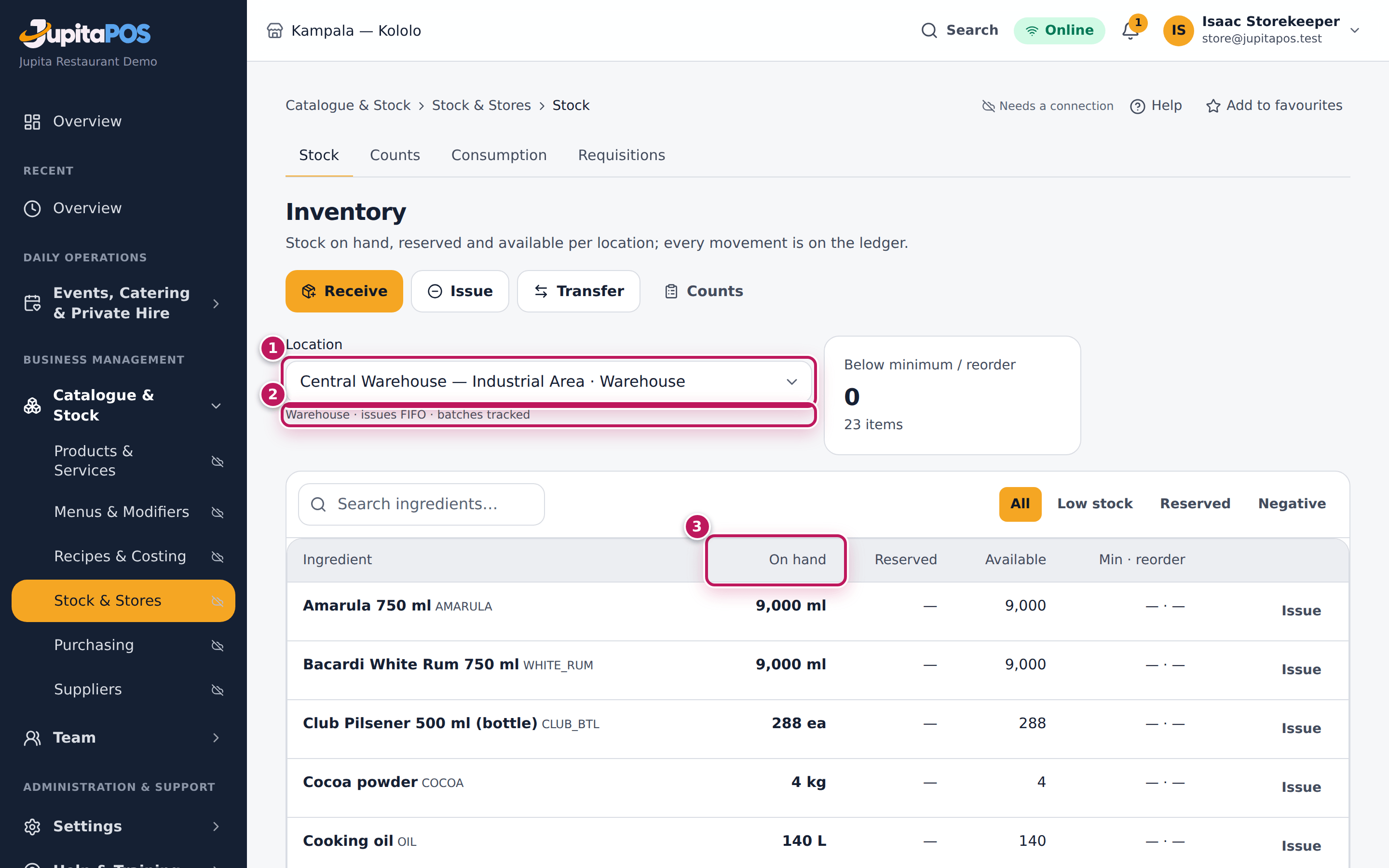
- Open Inventory. The Location list (1) holds every warehouse and every store of the branches you work at, each with its kind and branch.
- Choose one, here Central Warehouse — Industrial Area. The line under the list (2) gives its kind and rules: Warehouse · issues FIFO · batches tracked.
- Read what it holds in the table: On hand (3), Reserved, Available.
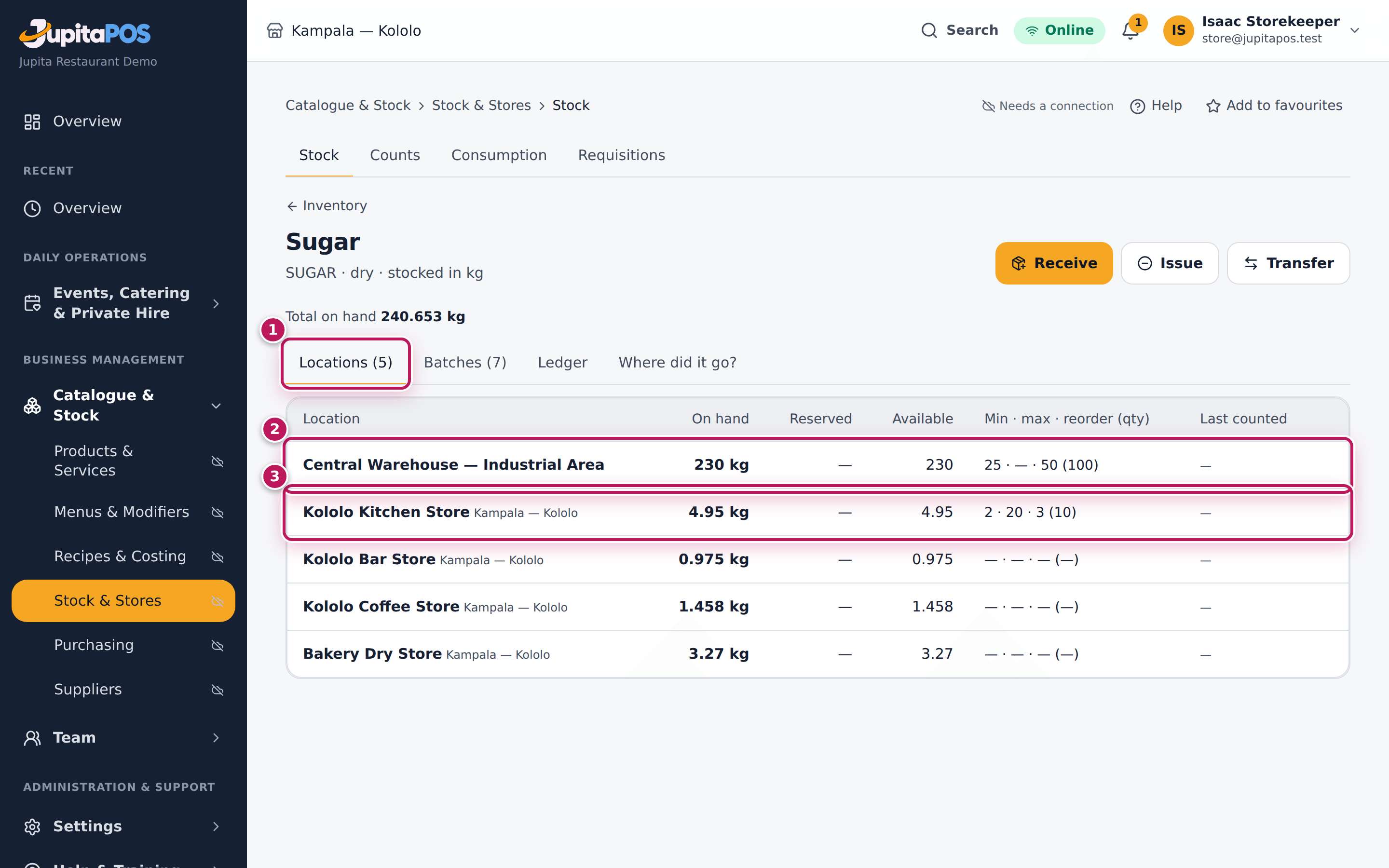
- To see one item in every store, tap its name, here Sugar. The Locations tab (1) lists each store (2, 3) with its stock and levels.
- If you may change stores, open Inventory → Setup (
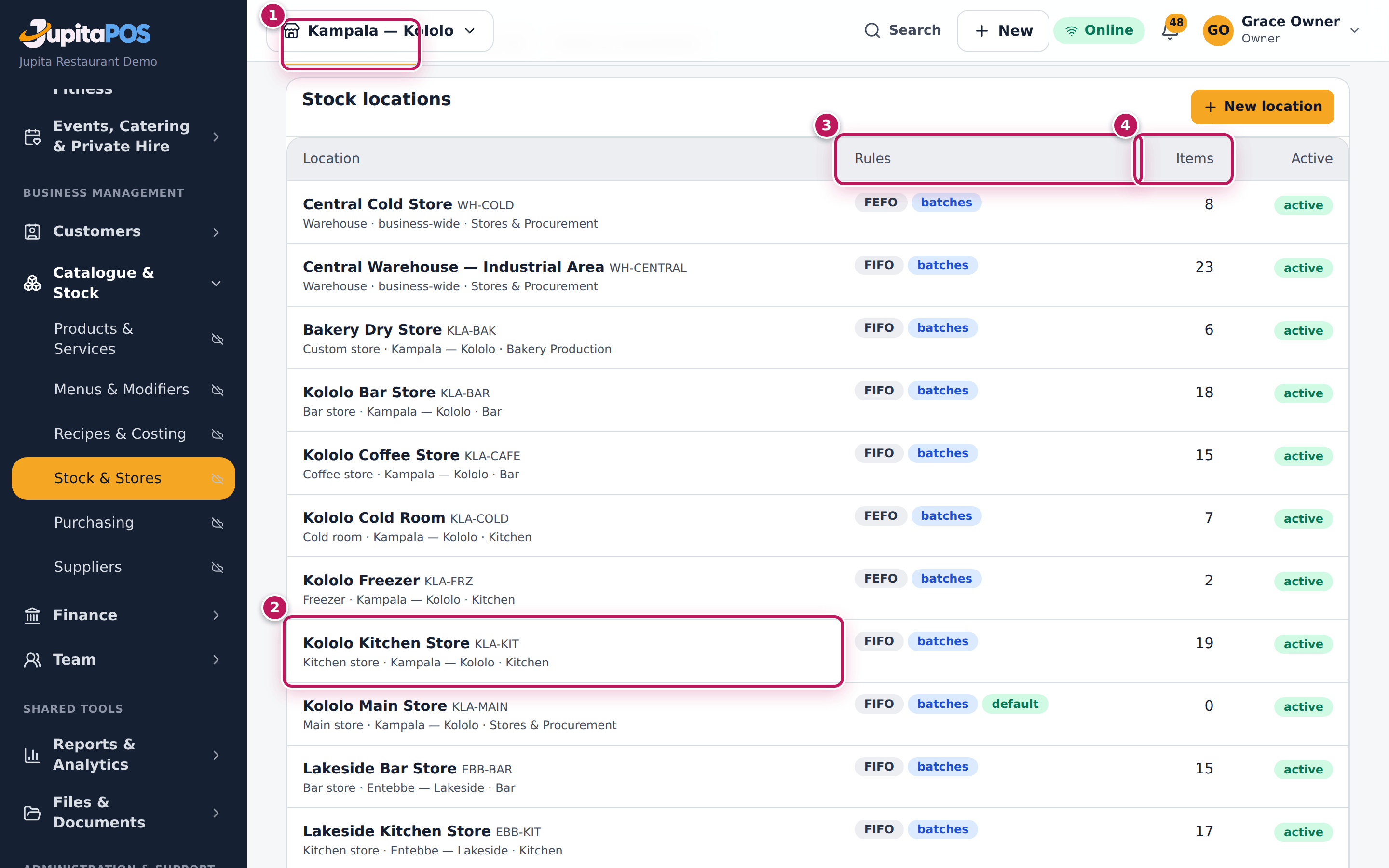
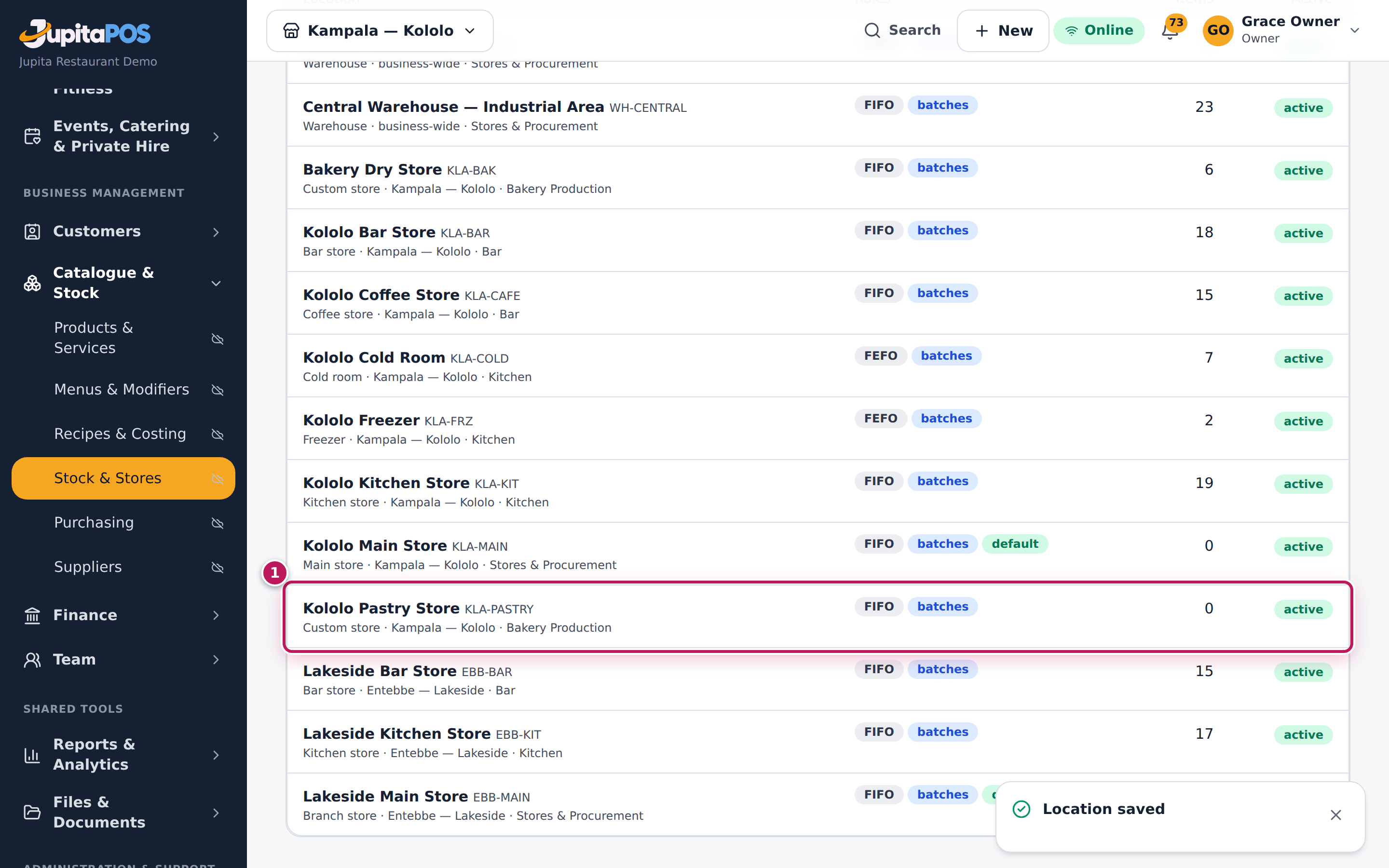
/inventory/setup). The Locations tab (1) lists every store with its kind, branch and department (2), its Rules (3) and the number of Items (4) it holds.
Expected result
The storekeeper at Kololo sees nine locations: the two warehouses and the seven Kololo stores (the Entebbe stores belong to another branch). Sugar’s page shows it in the warehouse, the kitchen, the bar, the coffee store and the bakery store. The set-up list shows all twelve locations of the business.
Screenshot
Common mistakes
- Mixing up the Main store and the Kitchen store. Sales in the kitchen take stock from the Kitchen store (see Which store an outlet uses). Stock left in the Main store is not used by sales until it is transferred.
Troubleshooting
- A store is missing from the list. It belongs to a branch you do not work at, or it was archived.
- Setup is not on the Inventory page. The button needs
inventory.manage; the page itself needsstock_locations.manage,units.manageorprocurement.suppliers.
Add a store
Purpose
Give a new room, fridge or bar its own stock — so what is in it can be received, issued, counted and valued on its own.
Role / permission required
Owner, general manager, store manager or anyone with
stock_locations.manage.
Prerequisites
- The branch and the department exist (see Branches).
Steps
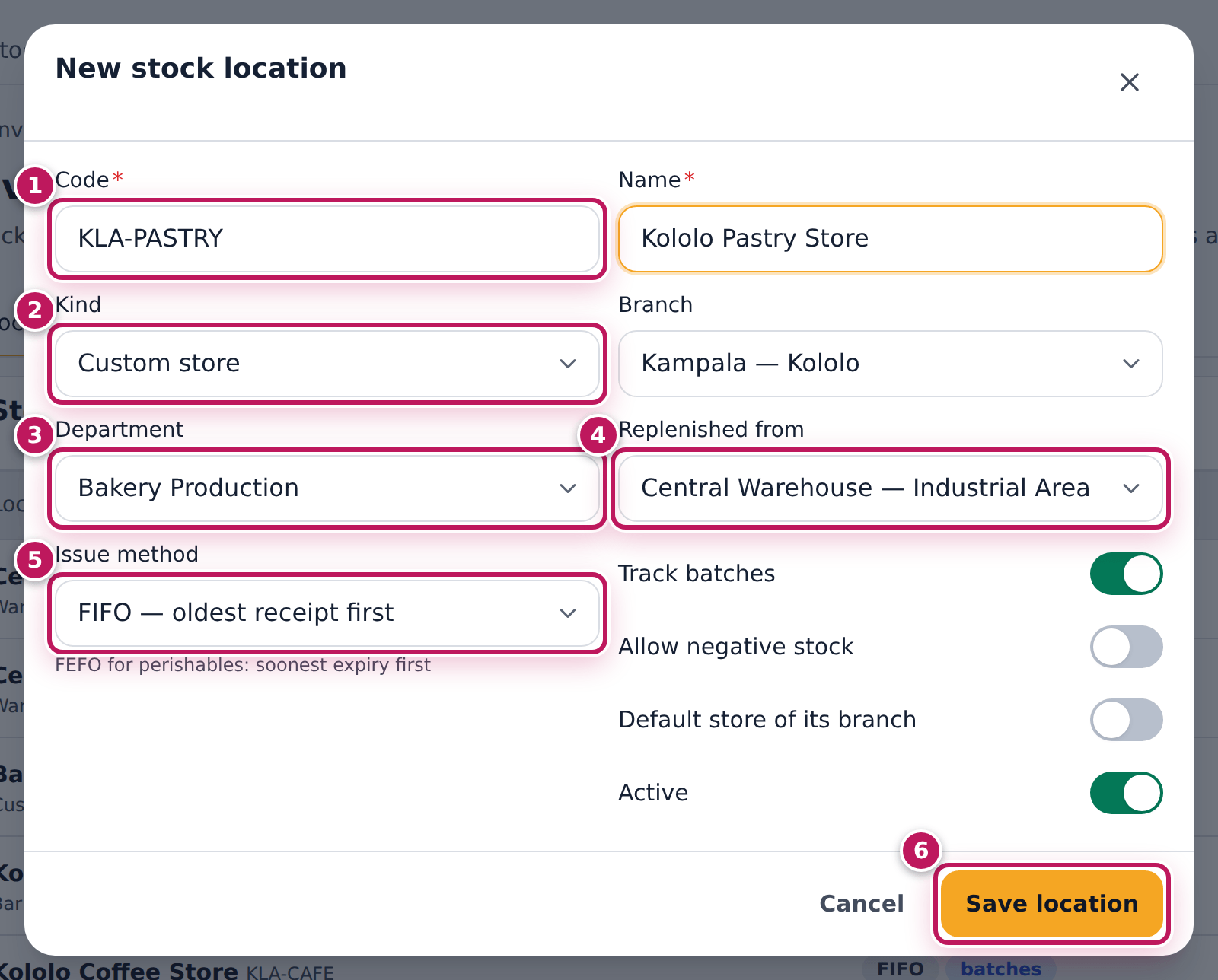
- Open Inventory → Setup. On the Locations tab tap New location.
- Type a Code (1), such as KLA-PASTRY, and the Name, Kololo Pastry Store.
- Choose the Kind (2): Custom store here; Warehouse for a store that serves every branch (it has no branch).
- Choose the Branch: Kampala — Kololo.
- Choose the Department (3) it serves: Bakery Production.
- Choose where it is Replenished from (4): Central Warehouse — Industrial Area.
- Choose the Issue method (5): FIFO — oldest receipt first, or FEFO — soonest expiry first for perishables.
- Leave Track batches on. Turn on Allow negative stock only if people must issue before a delivery is received. Leave Default store of its branch off unless this is the branch’s main store.
- Tap Save location (6).
Expected result
The message Location saved appears and the new store is in the list with its code: Kololo Pastry Store — Custom store · Kampala — Kololo · Bakery Production, FIFO, batches, 0 items, active. It is in the Location list of the Inventory page, ready to receive or take a transfer.
Screenshot
Common mistakes
- A second store in the Kitchen department. Kitchen sales use only one kitchen store per branch (see Which store an outlet uses); a cold room or freezer in the same department holds stock that sales do not take.
- Default store switched on by mistake. Only one store per branch can be the default; saving moves the default from the old one to this one.
Troubleshooting
- “Code KLA-PASTRY is already used.” Codes are unique in the business, archived stores included. Choose another code.
- “A store belongs to a branch.” Choose a Branch, or choose the kind Warehouse.
- “You do not have permission to perform this action.” when you save.
Adding or changing a store needs
stock_locations.manage(owner, general manager, store manager, administrator). - “Transfer the stock out before archiving this location.” A store with stock cannot be archived (Archive in the edit dialog).
Units and conversions
Purpose
Count stock the way it really arrives — crates, trays, jerrycans — while recipes and the books keep one stock unit per item.
Role / permission required
Owner, general manager, store manager or anyone with units.manage.
Prerequisites
- None. The common units (g, kg, ml, L, each, bottle, crate, tray, pack…) are already there, marked system.
Steps
- Open Inventory → Setup and tap Units & conversions.
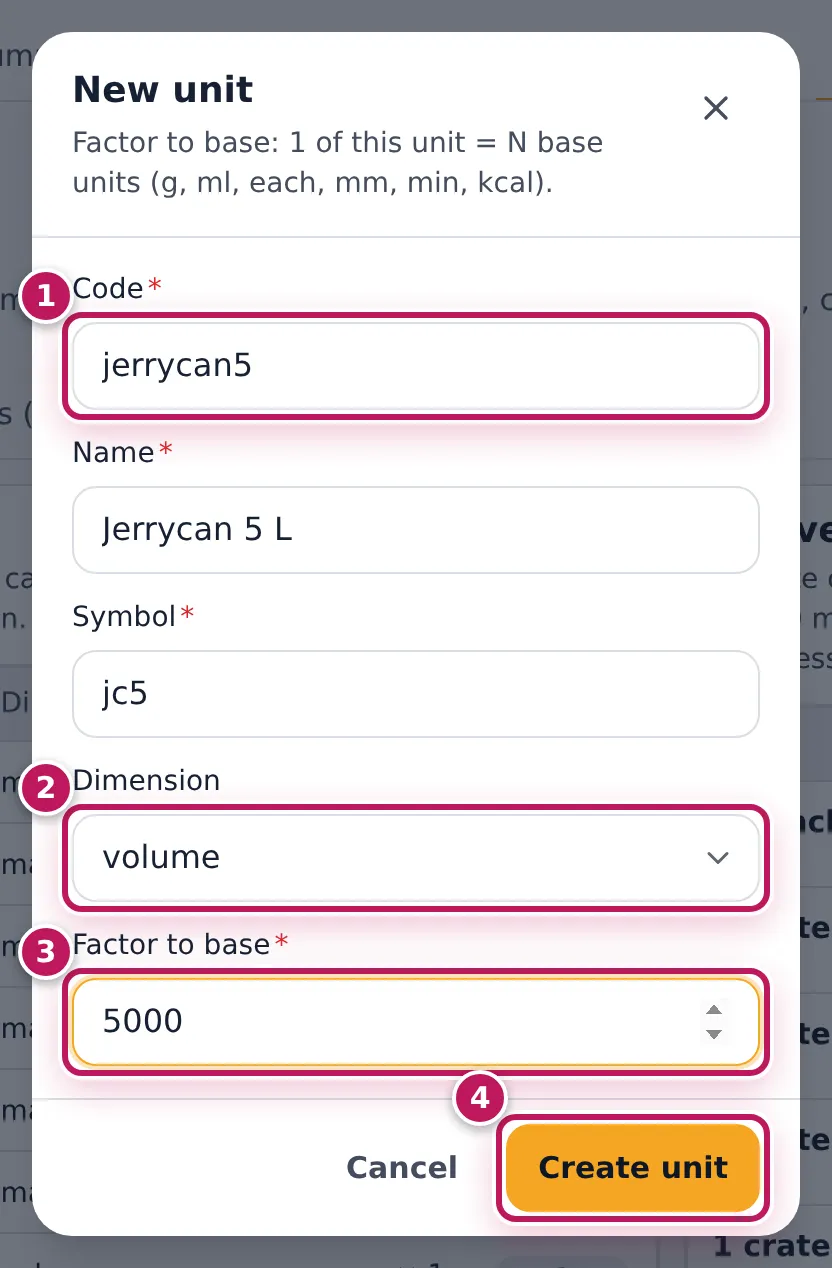
- To add a unit, tap New unit. Type the Code (1) (jerrycan5), Name (Jerrycan 5 L) and Symbol (jc5).
- Choose the Dimension (2): volume. Type the Factor to base (3): how many base units (g, ml or each) one of it is — 5000 ml.
- Tap Create unit (4).
- To say how two units relate for one item, tap New conversion.
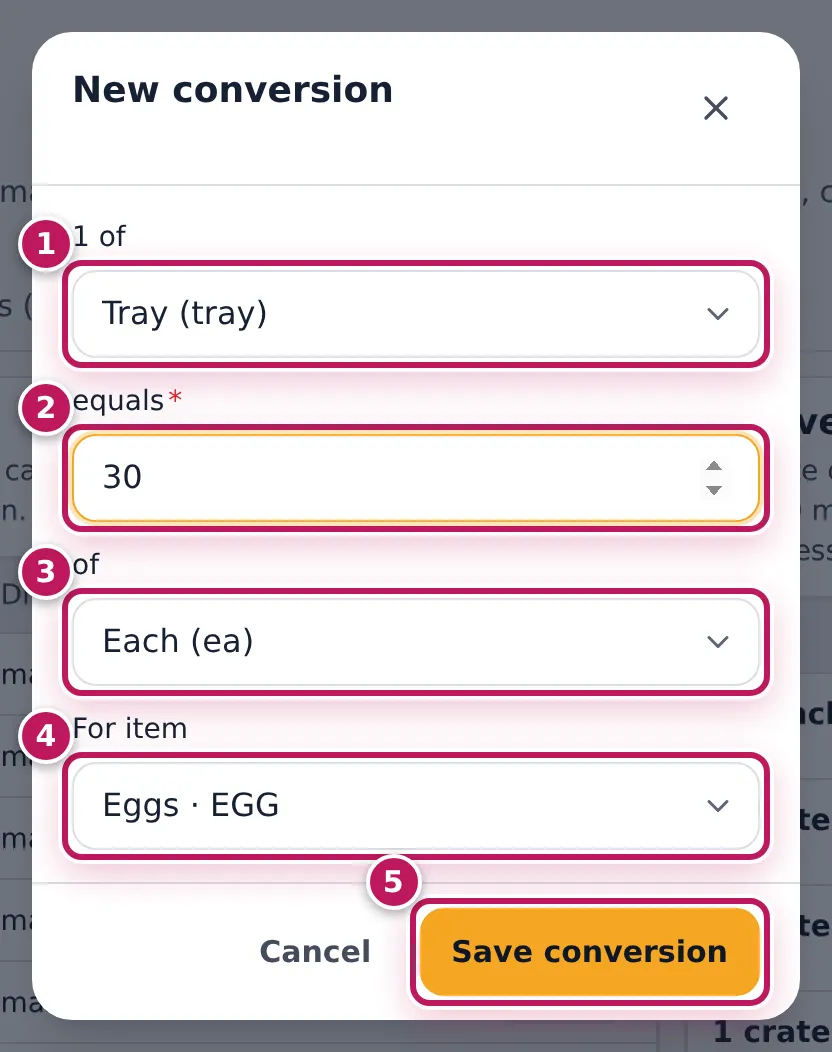
- Choose 1 of (1): Tray (tray); type equals (2): 30; choose of (3): Each (ea).
- Choose For item (4): Eggs · EGG. Leave it on Every item (business default) for a rule that is true for everything.
- Tap Save conversion (5).
Expected result
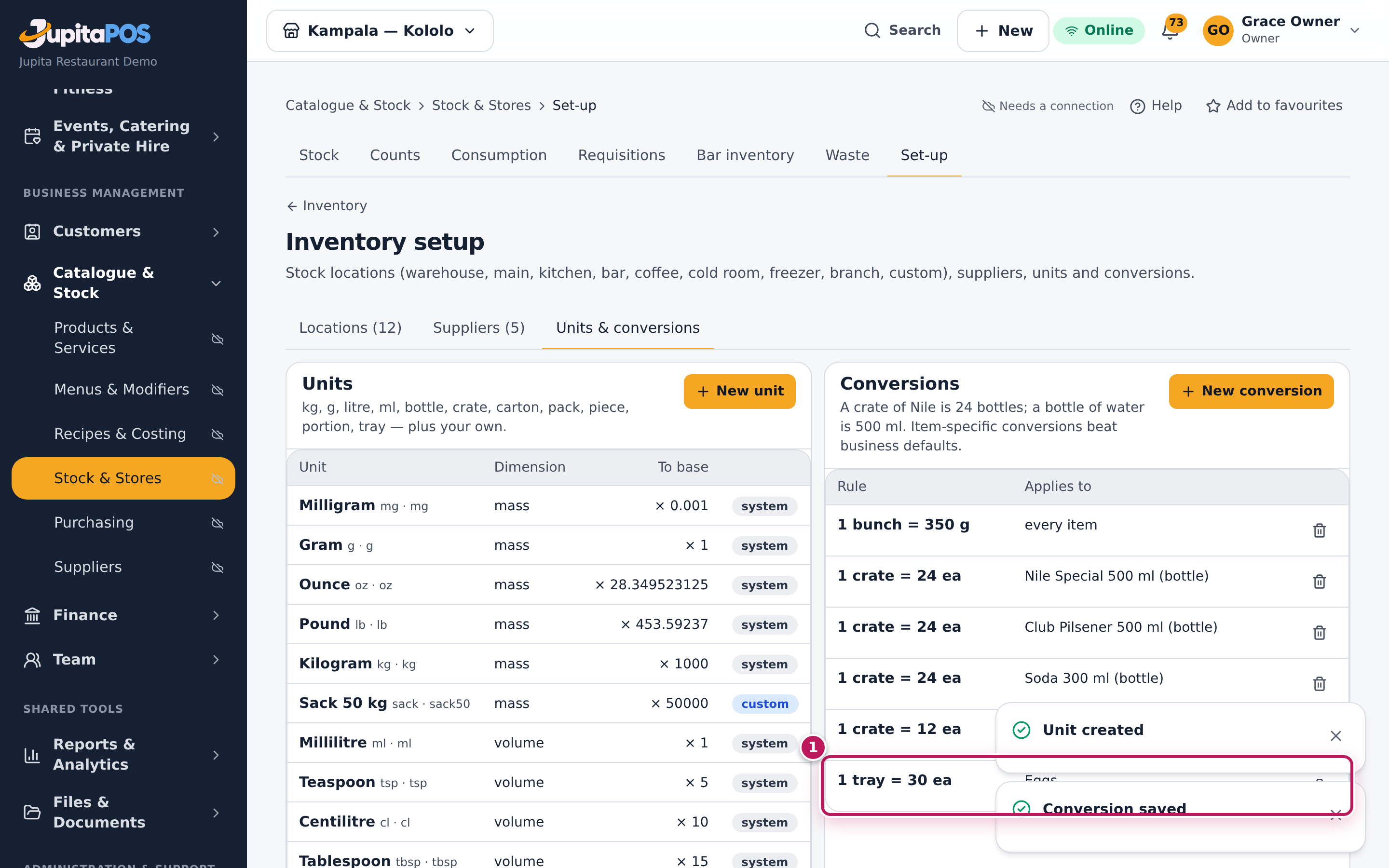
Unit created and Conversion saved appear. The unit list shows Jerrycan 5 L · jc5, volume, × 5000, custom. The Conversions list shows 1 tray = 30 ea for Eggs (1), next to the demo’s crate rules (1 crate = 24 bottles of Nile Special). From now on a delivery of 3 trays of eggs can be received in trays and is stocked as 90 eggs.
Screenshot
Common mistakes
- A business-wide rule for something that differs per item. A crate is 24 bottles of beer but 12 of water: make one conversion per item.
- The factor the wrong way round. Read it aloud: 1 tray equals 30 each.
Troubleshooting
- “Unit code jerrycan5 already exists.” Choose another code.
- “Choose two different units.” 1 of and of are the same unit.
- Saving the same rule again. It replaces the factor; there is never more than one rule for the same two units and item. The bin removes one.
Which store an outlet uses
Purpose
Make sure each sale takes its ingredients from the store where they really are — kitchen dishes from the kitchen store, drinks from the bar — so the stores stay true without anyone issuing stock by hand.
Role / permission required
Seeing the rule: anyone with inventory.view. Changing a store’s department
or default: stock_locations.manage.
Prerequisites
- The menu items have recipes (see Write a recipe for a menu item) and are sent to the right station (see Set up stations and routing).
Steps
- Know the rule. When a sale closes, each item’s ingredients are taken from
one store of that branch, chosen by the item’s station. First the store
of the station’s own kind:
- kitchen items: a Kitchen store;
- bar items: a Bar store;
- barista (café) items: a Coffee store. If the branch has no store of that kind, the store’s Department decides: kitchen items a kitchen department’s store, bar items a bar department’s, barista items a barista, bar or kitchen department’s, and bakery items a bakery or kitchen department’s. Anything else, or when no store fits: the branch’s default store. If two stores fit, the default store comes first, then the store created first. Warehouses are never used by sales.
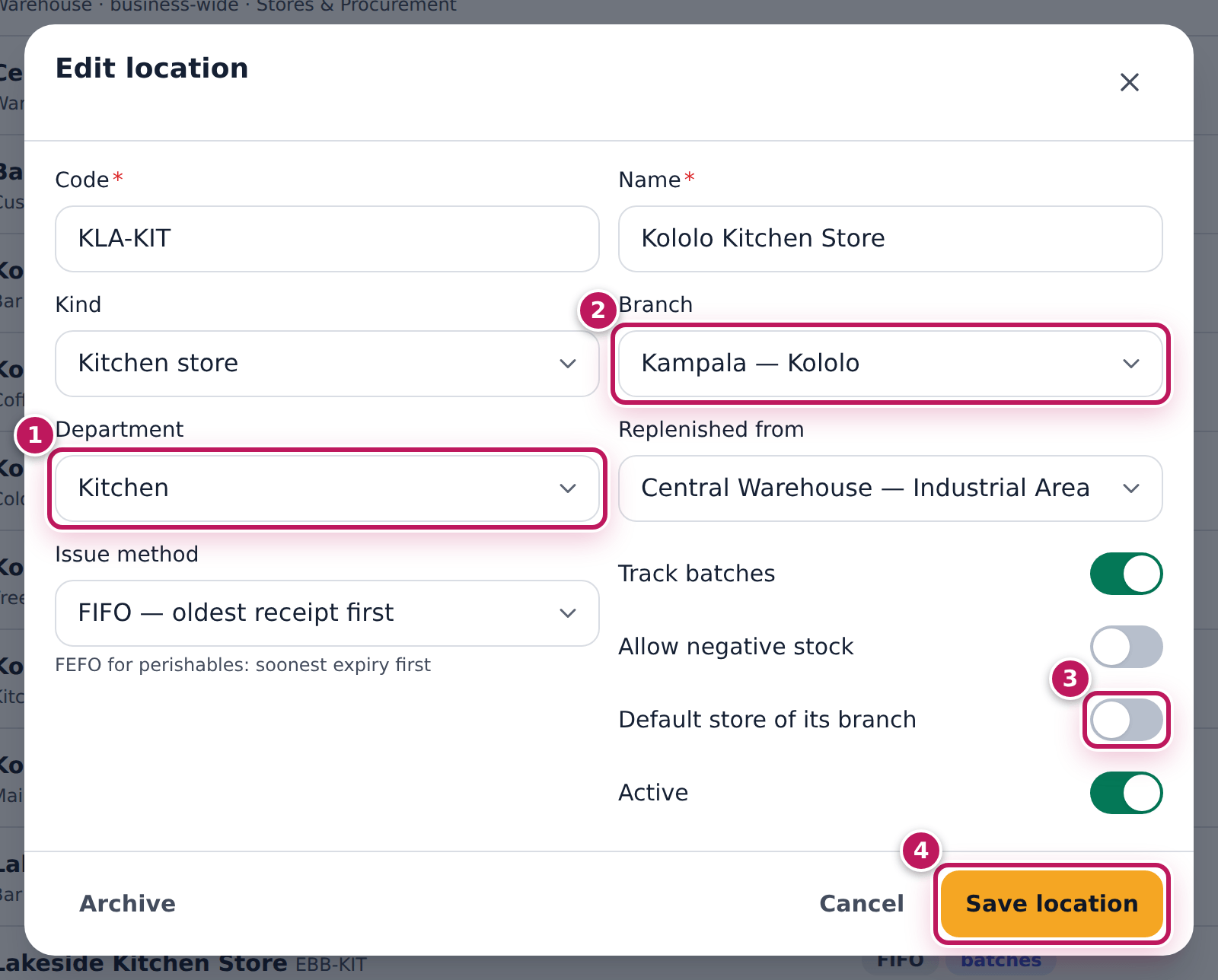
- Open Inventory → Setup and tap the store, here Kololo Kitchen Store.
- Check its Department (1): Kitchen, and its Branch (2).
- Check Default store of its branch (3): off here — Kololo Main Store is the default.
- Change what is wrong and tap Save location (4).
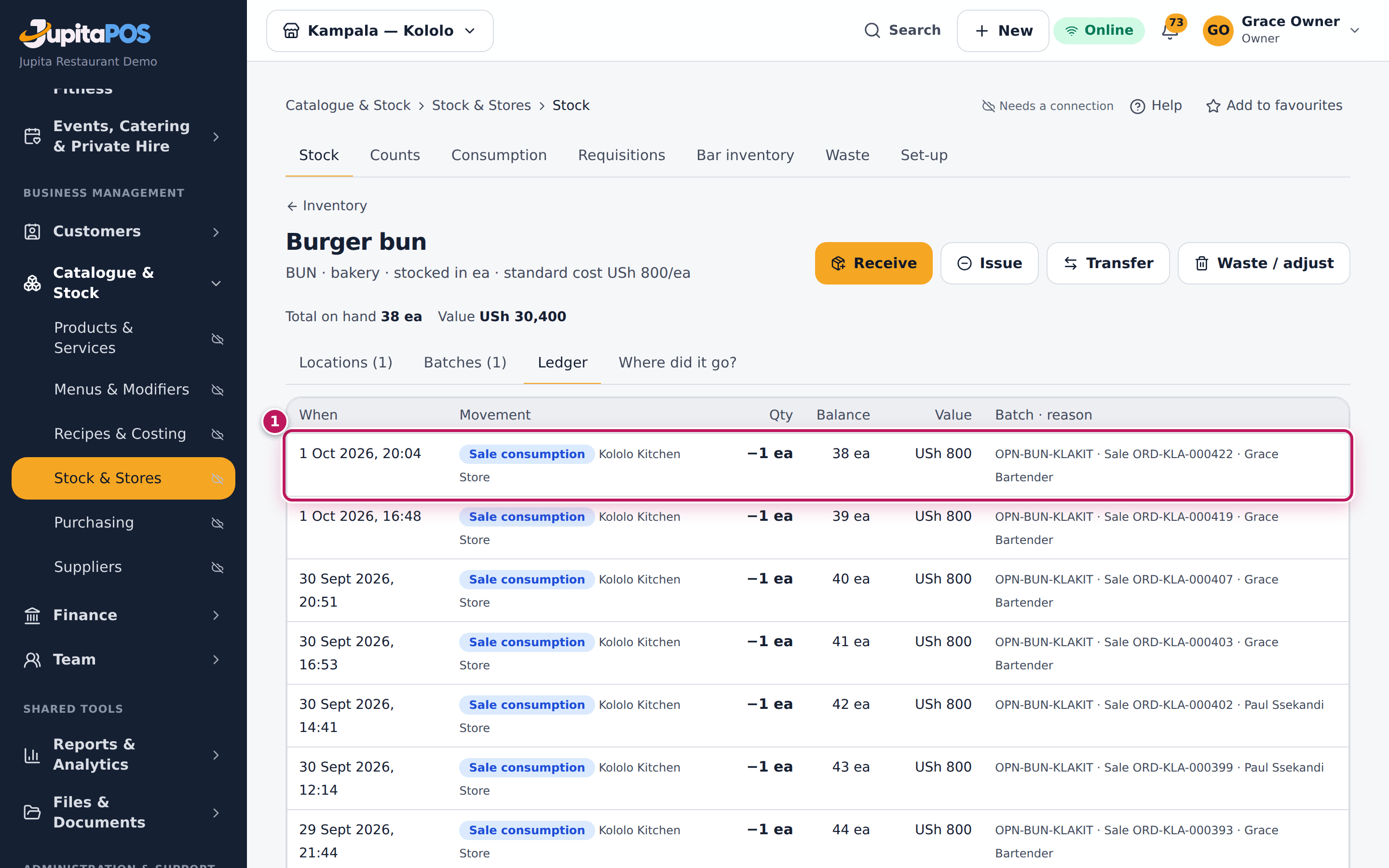
- To check, open an ingredient that sales use, such as Burger bun at Kololo Kitchen Store, and tap Ledger.
Expected result
Location saved. The burger buns’ ledger shows Sale consumption rows out of Kololo Kitchen Store (1): each burger sold took its bun from there. In the demo, kitchen sales use Kololo Kitchen Store, bar sales Kololo Bar Store and café (barista) sales Kololo Coffee Store.
Screenshot
Common mistakes
- Keeping the stock sales use in another store. Beef in the cold room is not the kitchen store’s beef; transfer what the day’s service needs to the store sales use, or the kitchen store goes negative.
- Two stores of one department. Only one of them is used by sales.
Troubleshooting
- The coffee store goes negative on milk and cups. Café sales take from the coffee store; transfer what the day needs into it from the cold room or the warehouse.
- Sales took nothing from any store. The branch has no store other than warehouses, or the items have no recipe.