

On this page
A recipe tells the kitchen how a dish is made and tells the business what it costs. It links a menu item to its ingredients (and to other recipes), and JupitaPos works out the batch cost, the portion cost and the gross margin against the selling price. When an ingredient’s price changes, every recipe that uses it is costed again by itself.
Open Recipes & costing from the sidebar (/recipes). It has two tabs:
Recipes and Ingredients. Recipes also drive stock: when a dish is
sold, its recipe says which ingredients leave which store (see
See what sales used).
The screens in this manual are the demo business, Jupita Restaurant Demo, at Kampala — Kololo. Amounts are in Uganda shillings.
Who sees what
| You can | Permission | Usually |
|---|---|---|
| See recipes and ingredients, without costs | menu.view |
everyone who serves or cooks |
| Add and change ingredients and recipes, activate versions | menu.recipes |
owner, general manager, chef, sous chef, store manager |
| See ingredient costs, recipe costs and margins | menu.costs |
managers, chef, store manager, accountant |
Without menu.costs the screens still work, but every cost and margin shows
“—” and the cost field of an ingredient cannot be changed.
How a cost is worked out
gross quantity      = net quantity ÷ trimming yield ÷ (1 − line waste)
line cost           = gross quantity × the ingredient's cost per unit
sub-recipe line     = quantity × (the sub-recipe's batch cost ÷ its net yield)
batch cost          = the lines added up (optional lines left out)
net yield           = yield × (1 − prep loss) × (1 − cooking loss)
portion cost        = batch cost ÷ portions
gross margin        = (selling price − portion cost) ÷ selling price
food cost %         = portion cost ÷ selling price
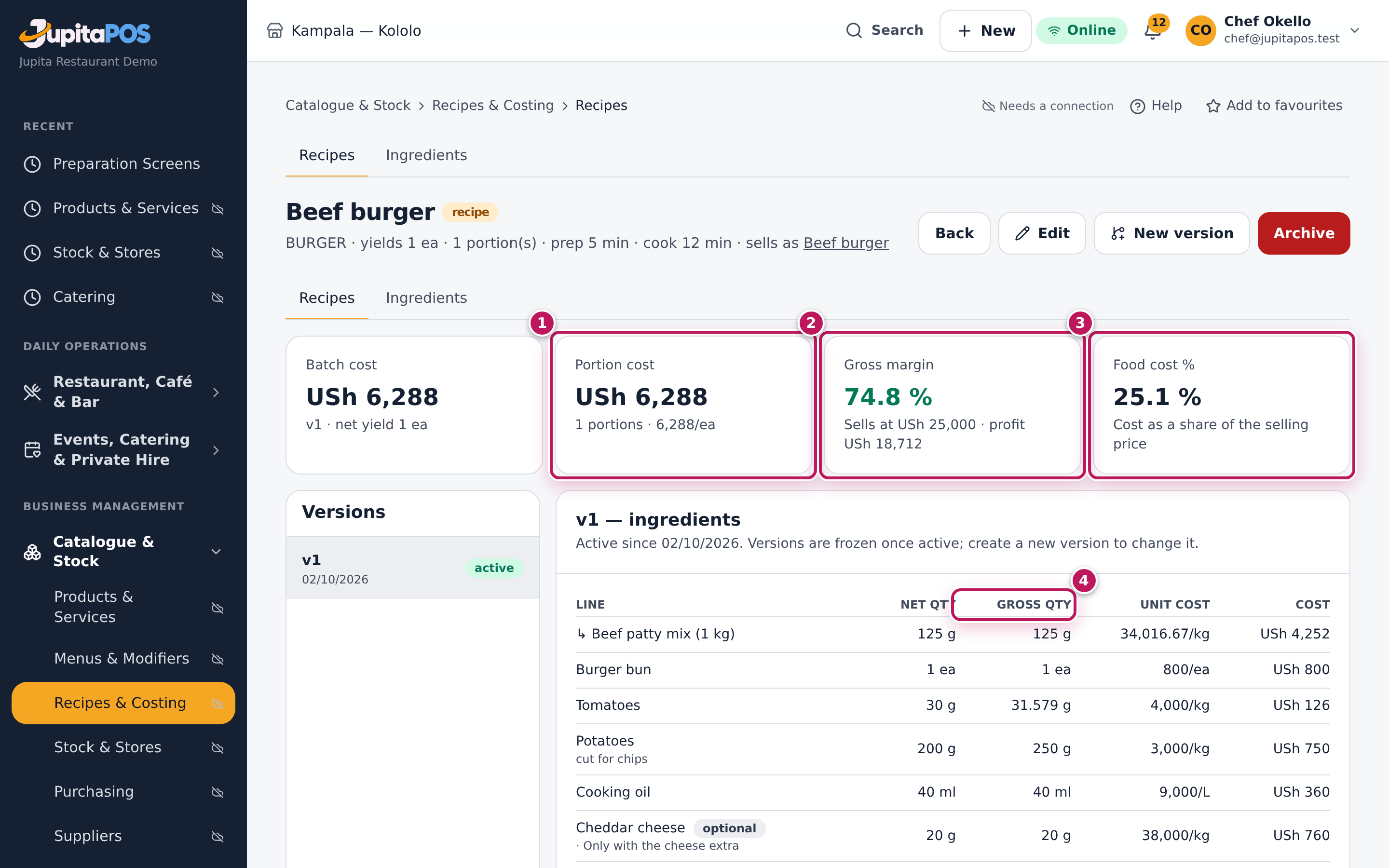
The demo’s Beef burger shows it end to end. The sub-recipe Beef patty mix (1 kg) uses 900 g of beef mince (USh 28,000 a kg, 85 % trimming yield, so 1,058.8 g are bought: USh 29,647), grated onions, mixed spices and salt — a batch of USh 30,615. With 10 % cooking loss the batch gives 0.9 kg, so the mix costs USh 34,016.67 a kg. The burger uses 125 g of it (USh 4,252), a bun (800), tomatoes (126), potatoes for chips (750) and cooking oil (360): USh 6,288. It sells at USh 25,000, so the gross margin is 74.8 % and the food cost 25.1 %. The cheddar is an optional line (the cheese extra), so it is not in the batch cost.
Two more things change a sold item’s cost: a variant’s recipe factor (a large portion at 1.4 × the recipe) and a modifier option linked to an ingredient (an extra egg). Both are set on the menu item (see Add a menu item and Create a modifier group).
Add an ingredient
Purpose
Every recipe is built from ingredients. An ingredient carries what one unit costs you and how much of it is usable after peeling and trimming, so the recipes that use it are costed right — and the stores can hold it.
Role / permission required
Chef, sous chef, store manager or owner — anyone with menu.recipes. To
enter the cost you also need menu.costs.
Prerequisites
- You know the unit you stock and cook it in (kg, L, each) and what one unit costs you today.
- The unit exists (see Units and conversions).
Steps
- Open Recipes & costing and tap the Ingredients tab.
- Tap New ingredient. The New ingredient dialog opens.
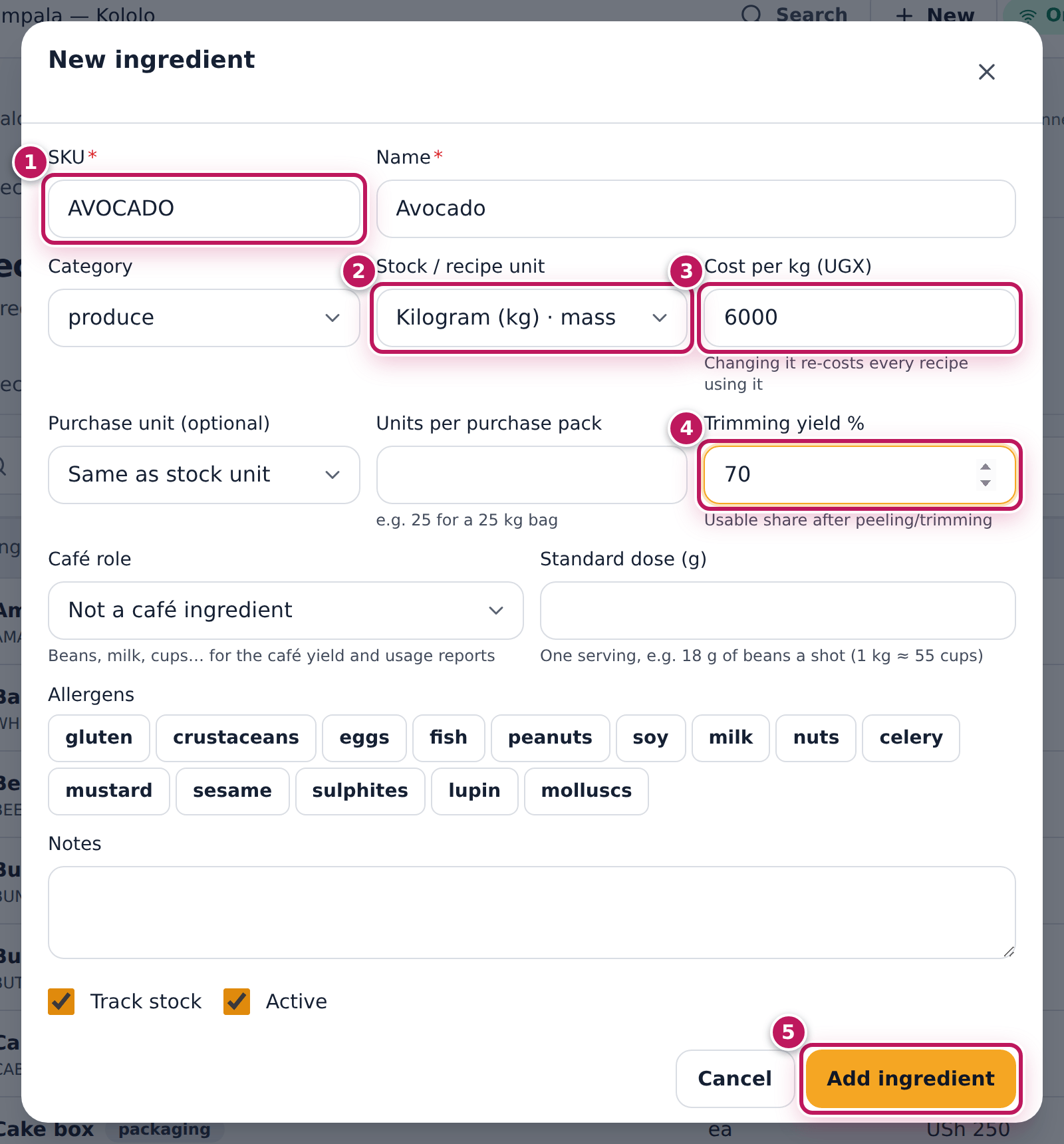
- Type the SKU (1), a short code such as AVOCADO, and the Name, Avocado.
- Choose the Category, here produce.
- Choose the Stock / recipe unit (2): Kilogram (kg) · mass. Recipes and the stores count the ingredient in this unit.
- Type the cost of one unit in Cost per kg (UGX) (3): 6000.
- If you buy it in bigger packs, choose the Purchase unit (optional) and type Units per purchase pack (25 for a 25 kg bag).
- Type the Trimming yield % (4): the part you can use after peeling or trimming. For avocado, stone and skin go, so 70.
- Tap the Allergens it carries, if any. Leave Track stock ticked for anything the stores keep.
- Tap Add ingredient (5).
Expected result
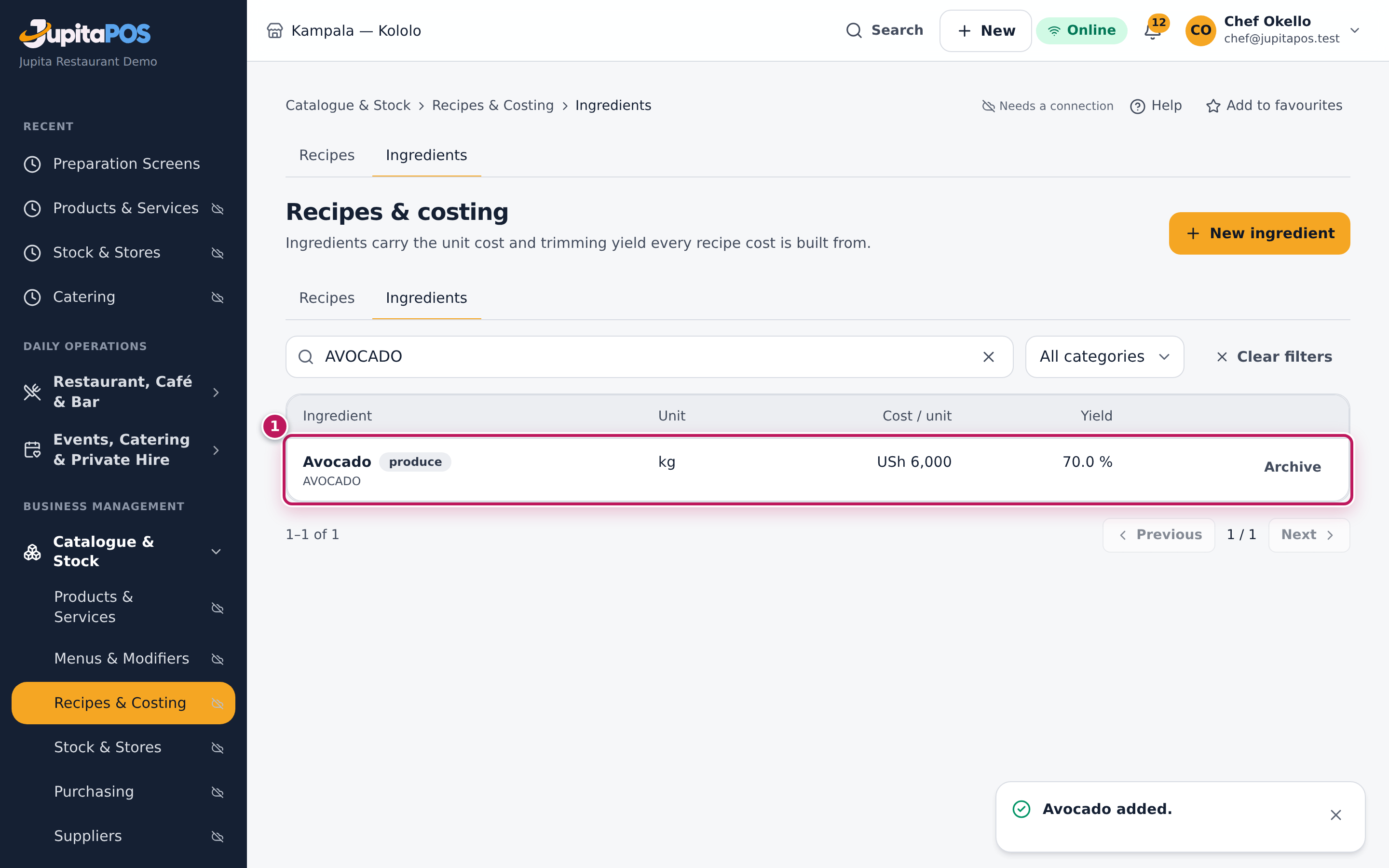
The dialog closes and the message Avocado added. appears. Search for the SKU and the list shows Avocado, produce, unit kg, USh 6,000 per unit and a yield of 70.0 %. A recipe that uses 100 g of avocado is costed on 143 g (100 ÷ 0.70), because that is what you have to buy.
Screenshot
Common mistakes
- A cost for the wrong unit. The field says per what (Cost per kg). A 25 kg bag of flour at USh 112,500 is 4,500 per kg, not 112,500.
- Leaving the yield at 100 % for meat or vegetables. Beef that loses 15 % in trimming costs more per usable kilo than the invoice says; with 100 % every dish that uses it looks cheaper than it is.
- Adding the same ingredient twice. Search first. Two “Tomatoes” split the stock and the costs between them.
Troubleshooting
- “This SKU is already used.” Another ingredient has that code — archived ones too. Use a different SKU, or find and edit the existing one.
- “Please enter a valid value” under Trimming yield %. The yield is a percentage from 0.01 to 100, with at most two decimals (70, 92.5).
- The cost field is greyed out (“Needs the costs permission”). You do
not have
menu.costs. Ask a manager to enter the cost.
FAQ
Where does the standard cost come from later? From you: change it on the ingredient when your supplier’s price changes (see Re-cost after a price change). Deliveries record their own cost in the stores, but they do not change the recipe cost.
Write a recipe for a menu item
Purpose
Give a dish its recipe so the kitchen has the method, the stores know what each sale uses, and the menu item shows its real cost and margin.
Role / permission required
Chef, sous chef, store manager or owner (menu.recipes).
Prerequisites
- The menu item exists (see Add a menu item).
- Its ingredients exist (see Add an ingredient).
Steps
- Open Recipes & costing and tap New recipe.
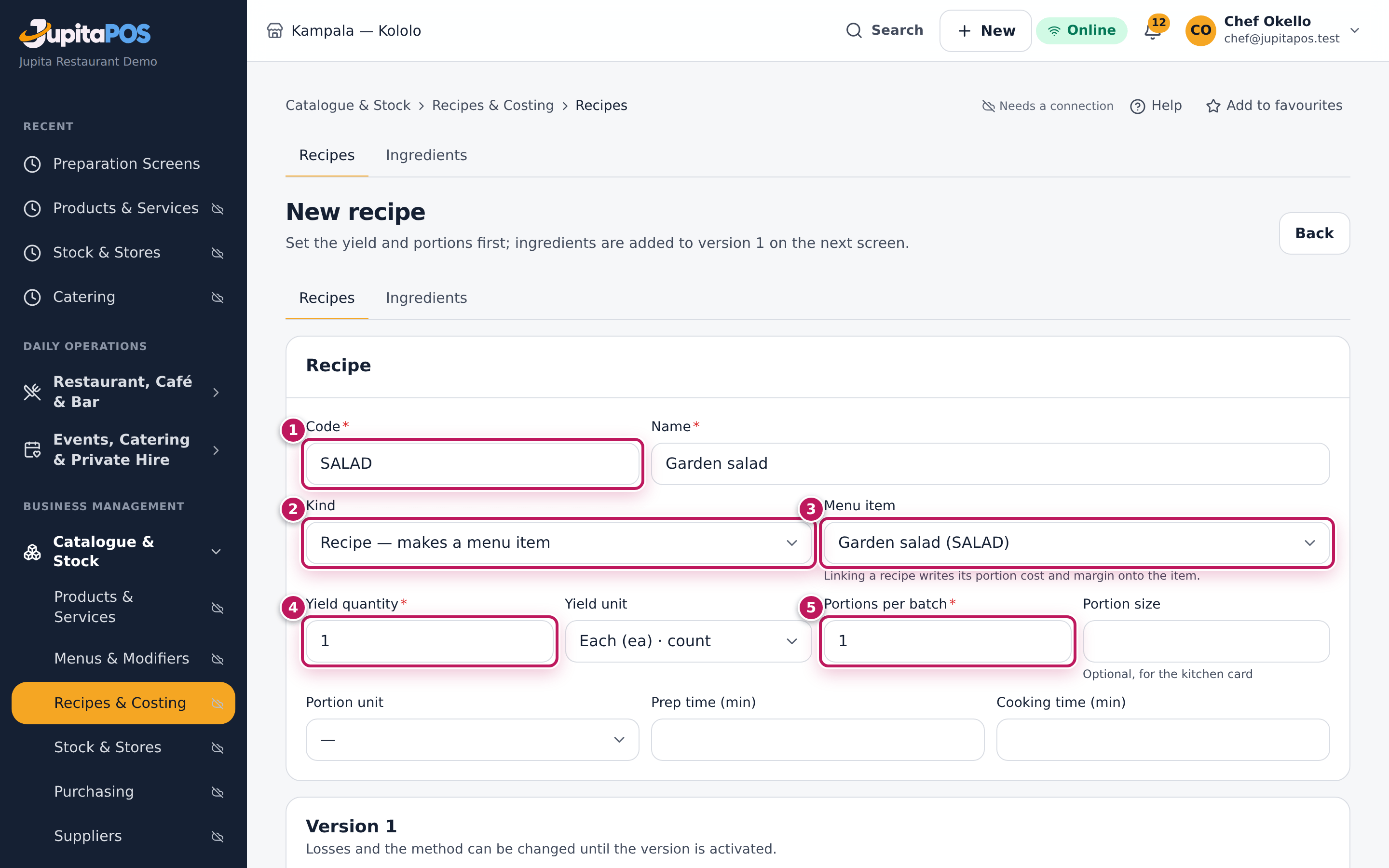
- Type a Code (1), such as SALAD, and the Name, Garden salad.
- Leave Kind (2) on Recipe — makes a menu item.
- Choose the Menu item (3) it makes: Garden salad (SALAD). Only items without a recipe are listed.
- Set the Yield quantity (4) and Yield unit — what one batch makes: 1, Each (ea).
- Set Portions per batch (5): 1. For a pot of stew that serves ten, the yield is 10 and the portions 10.
- Add the Prep time (min), and the Method / instructions, one step per line.
- Tap Create recipe. The recipe opens with an empty Draft v1.
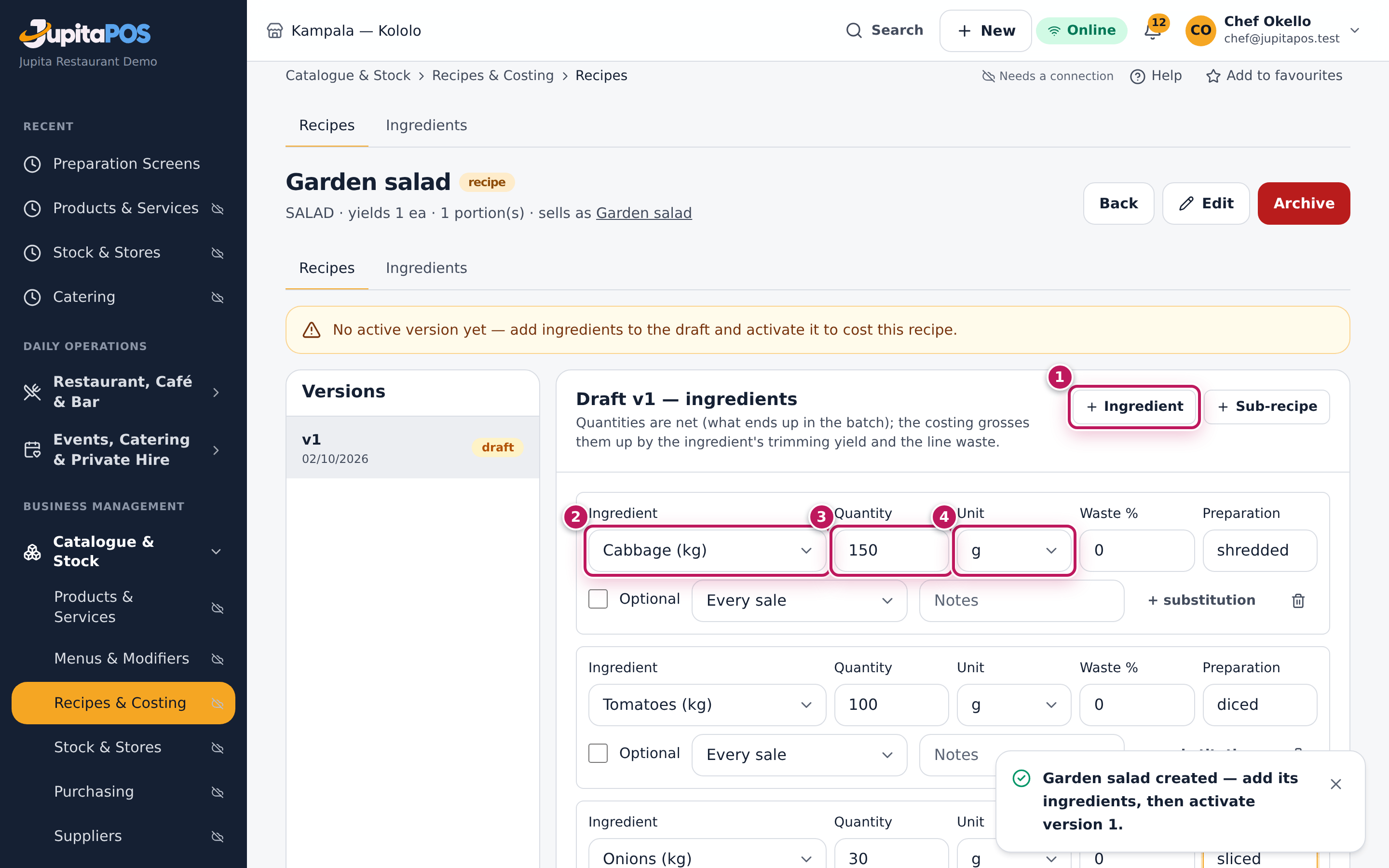
- Tap Ingredient (1) for each ingredient. On the new line choose the Ingredient (2), type the Quantity (3) and choose the Unit (4): cabbage 150 g, tomatoes 100 g, onions 30 g. Type the Preparation (shredded, diced, sliced) for the kitchen card.
- Tap Save draft.
- Tap Activate v1, then Activate in the question that follows.
Expected result
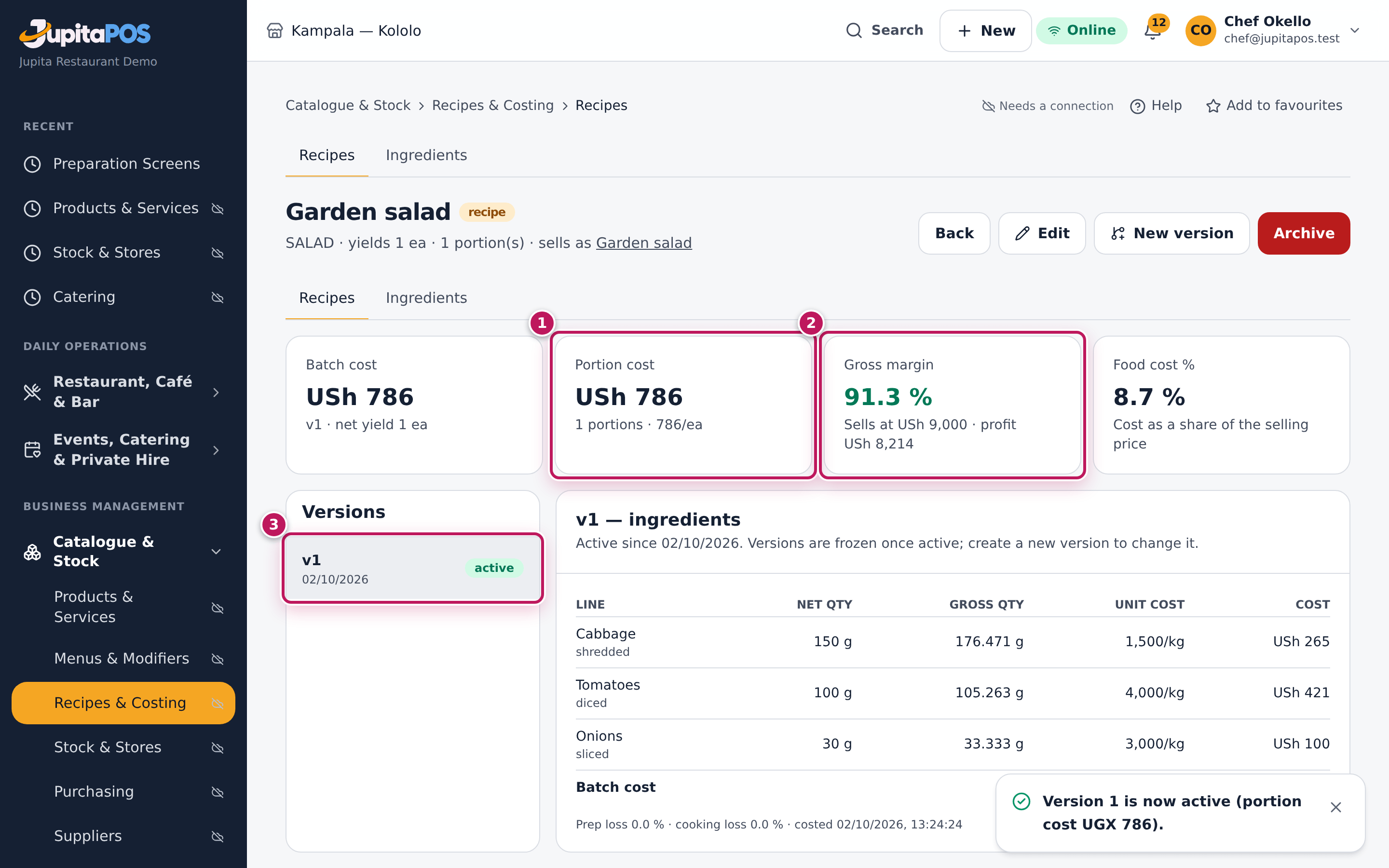
The message says Version 1 is now active (portion cost UGX 786) — the cost part only for people who may see costs. The cards at the top show the cost: the Garden salad costs USh 786 a portion and sells at USh 9,000, so the Gross margin is 91.3 % and the Food cost % 8.7 %. The version is frozen, the menu item now shows the same cost and margin, and from now on each salad sold takes its cabbage, tomatoes and onions out of the kitchen’s store.
Screenshot
Common mistakes
- Typing gross quantities. Type what ends up in the dish (net). The costing adds the trimming loss itself; typing the bought weight counts the loss twice.
- Forgetting to activate. A draft is not costed and does not take stock out when the dish sells. The recipe list shows no active version until you activate.
- Yield and portions that do not match. A batch that yields 10 but says 1 portion makes every plate cost the whole pot.
Troubleshooting
- “This code is already used.” Recipe codes are unique for ever, even after a recipe is archived. Choose another code.
- Activate v1 is greyed out. The draft has no lines yet, or you changed something since the last save: tap Save draft first (the page says Save the draft before activating it.).
- The menu item is not in the list. It already has a recipe — an active one or a draft. Open that recipe instead, or archive it first.
- “Garden salad already has the recipe …; archive it or pick another item.” Another live recipe (even a draft) is linked to that item. Archive it, or choose another item.
FAQ
Can I move a recipe to another menu item? Yes: tap Edit on the recipe, choose the other Menu item and save. The old item is freed at once (its recipe, cost and margin are cleared) and, if the recipe has an active version, the new item gets its cost and margin straight away. An archived recipe never changes a menu item’s cost again.
Make a sub-recipe and use it in dishes
Purpose
Cost once what the kitchen makes in batches — a sauce, a dough, a patty mix, kachumbari — and use it in any number of dishes. When the batch changes, every dish that uses it is costed again.
Role / permission required
Chef, sous chef, store manager or owner (menu.recipes).
Prerequisites
- Its ingredients exist (see Add an ingredient).
Steps
- Open Recipes & costing and tap New recipe.
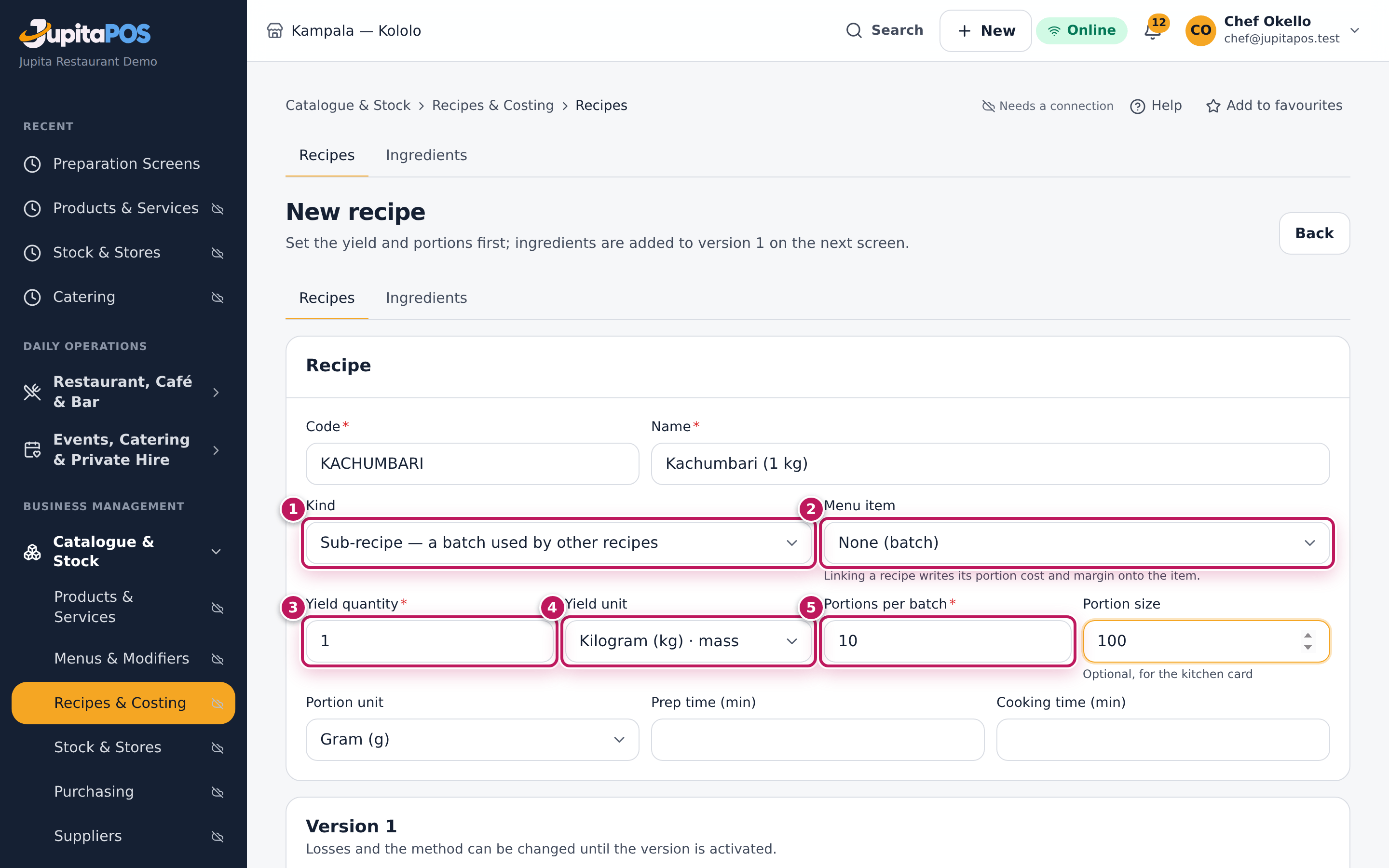
- Choose Kind (1): Sub-recipe — a batch used by other recipes. The Menu item (2) stays None (batch).
- Type the Code and Name, for example Kachumbari (1 kg).
- Set what one batch makes: Yield quantity (3) 1, Yield unit (4) Kilogram (kg), Portions per batch (5) 10, and a Portion size of 100 g for the kitchen card.
- Tap Create recipe, add the lines with Ingredient (tomatoes 600 g, onions 300 g, limes 60 g, salt 10 g) and type a Prep loss % of 5 under Losses & method.
- Tap Save draft, then Activate v1 and Activate.
- To use it: open the dish’s recipe, make a draft (see Change a recipe with a new version), tap Sub-recipe, choose the batch in the Sub-recipe list, type the quantity the dish uses, save and activate.
Expected result
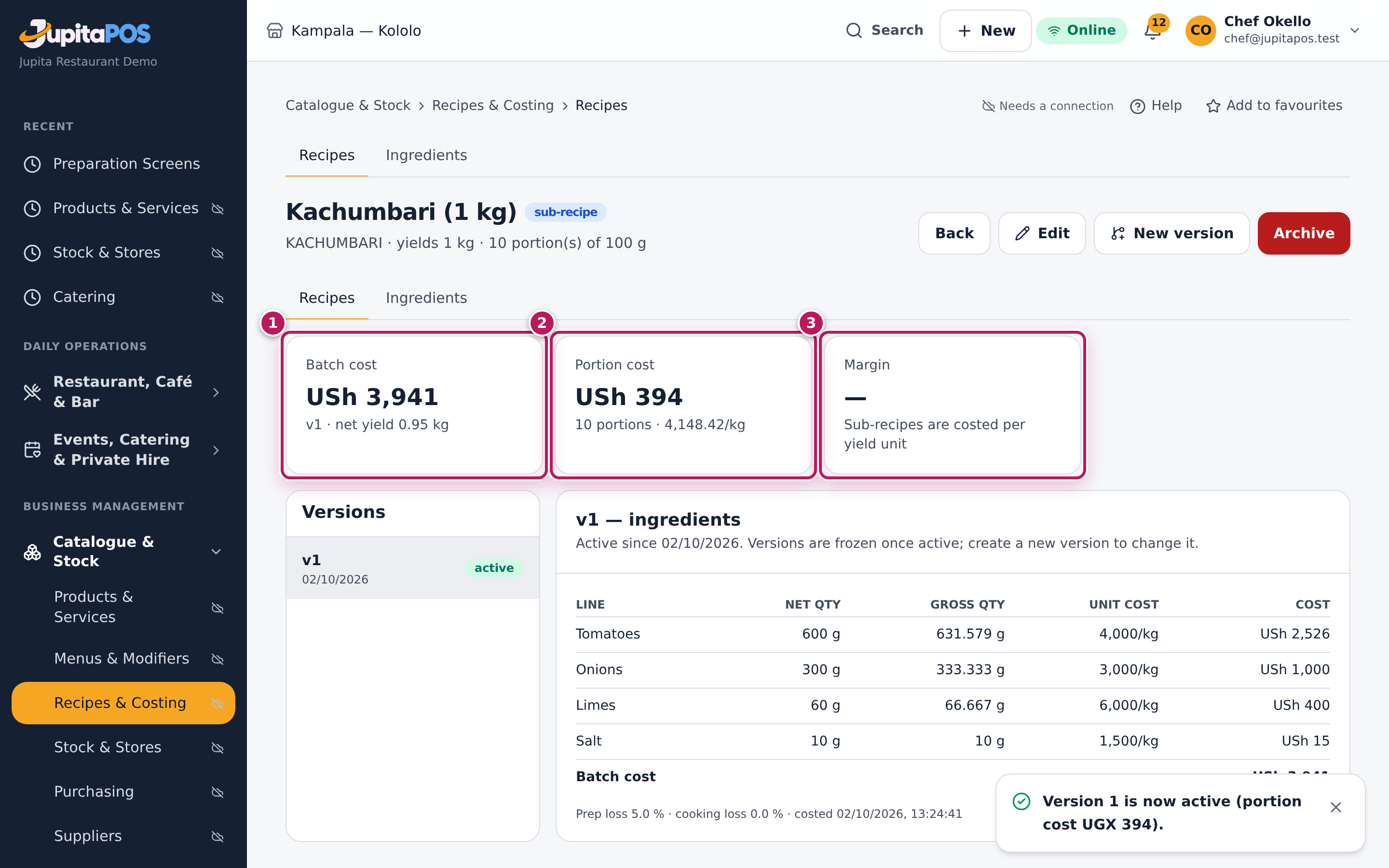
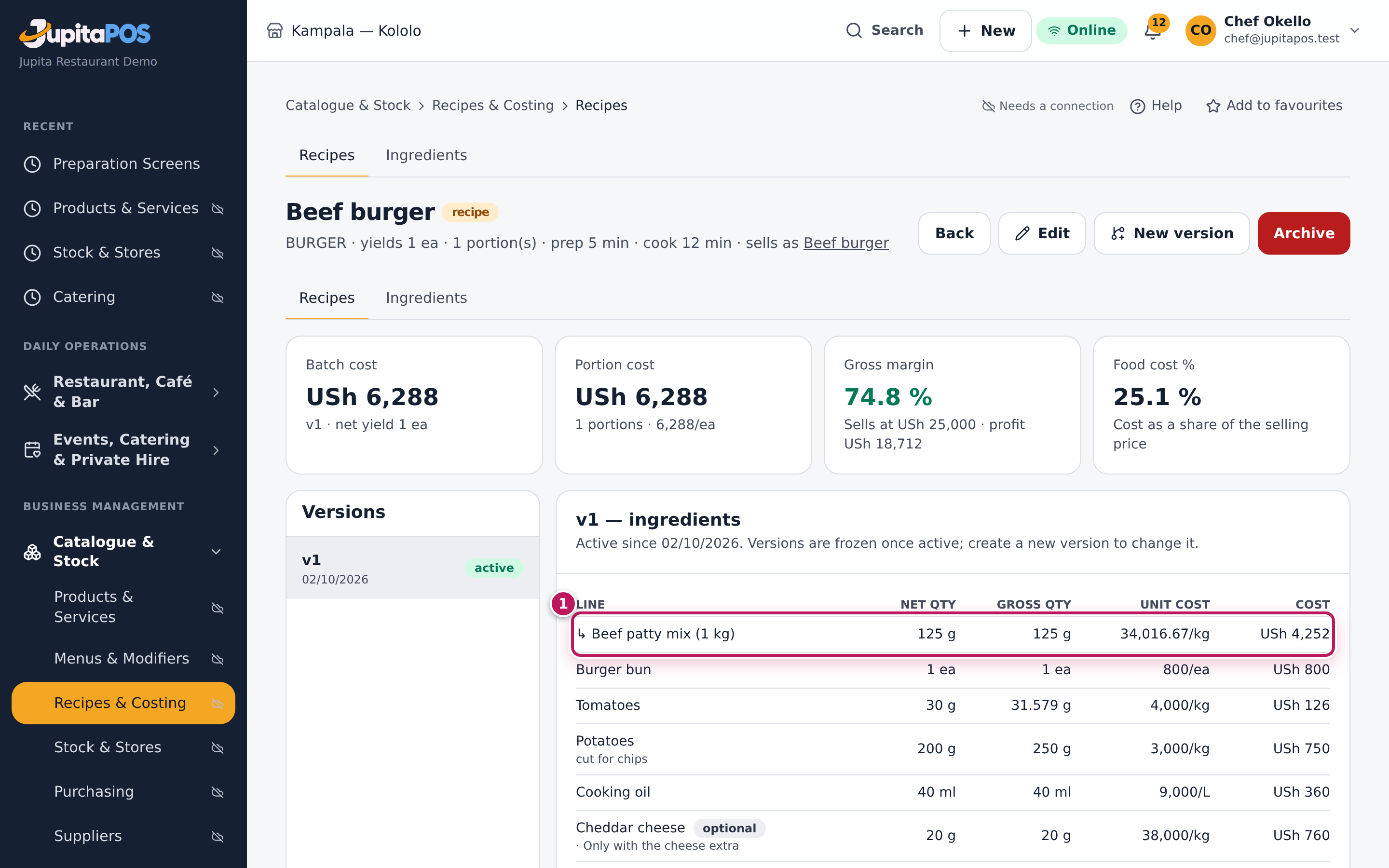
The sub-recipe is costed per unit of its yield: Kachumbari costs USh 3,941 a batch; with 5 % prep loss the batch gives 0.95 kg, so it costs USh 4,148.42 a kg and USh 394 a 100 g portion. The Margin card says Sub-recipes are costed per yield unit — a batch is not sold. In a dish, the line shows with an arrow, like ↳ Beef patty mix (1 kg) in the Beef burger: 125 g of it cost USh 4,252.
Screenshot
Common mistakes
- Making a sub-recipe for something you buy ready-made. Bought mayonnaise is an ingredient; your own house dressing is a sub-recipe.
- Using a sub-recipe that is not active. The list marks it — not costed; it counts as zero in the dish until you activate it.
- A yield in a different kind of unit than the dish uses. A sauce that yields litres is used in ml or L, not in grams.
Troubleshooting
- “… is used as a sub-recipe; remove it from those recipes first.” You tried to archive a batch that dishes still use. Take it out of their active versions first.
- The dish’s cost did not change after I changed the sub-recipe. Only the active version counts: activate the sub-recipe’s new version.
Read an item’s cost and margin
Purpose
See what each dish really costs and what it earns, to price it, to fix a recipe, or to push the dishes that pay best.
Role / permission required
Anyone with menu.costs: managers, chef, store manager, accountant.
Prerequisites
- The dish has an active recipe (see Write a recipe for a menu item).
Steps
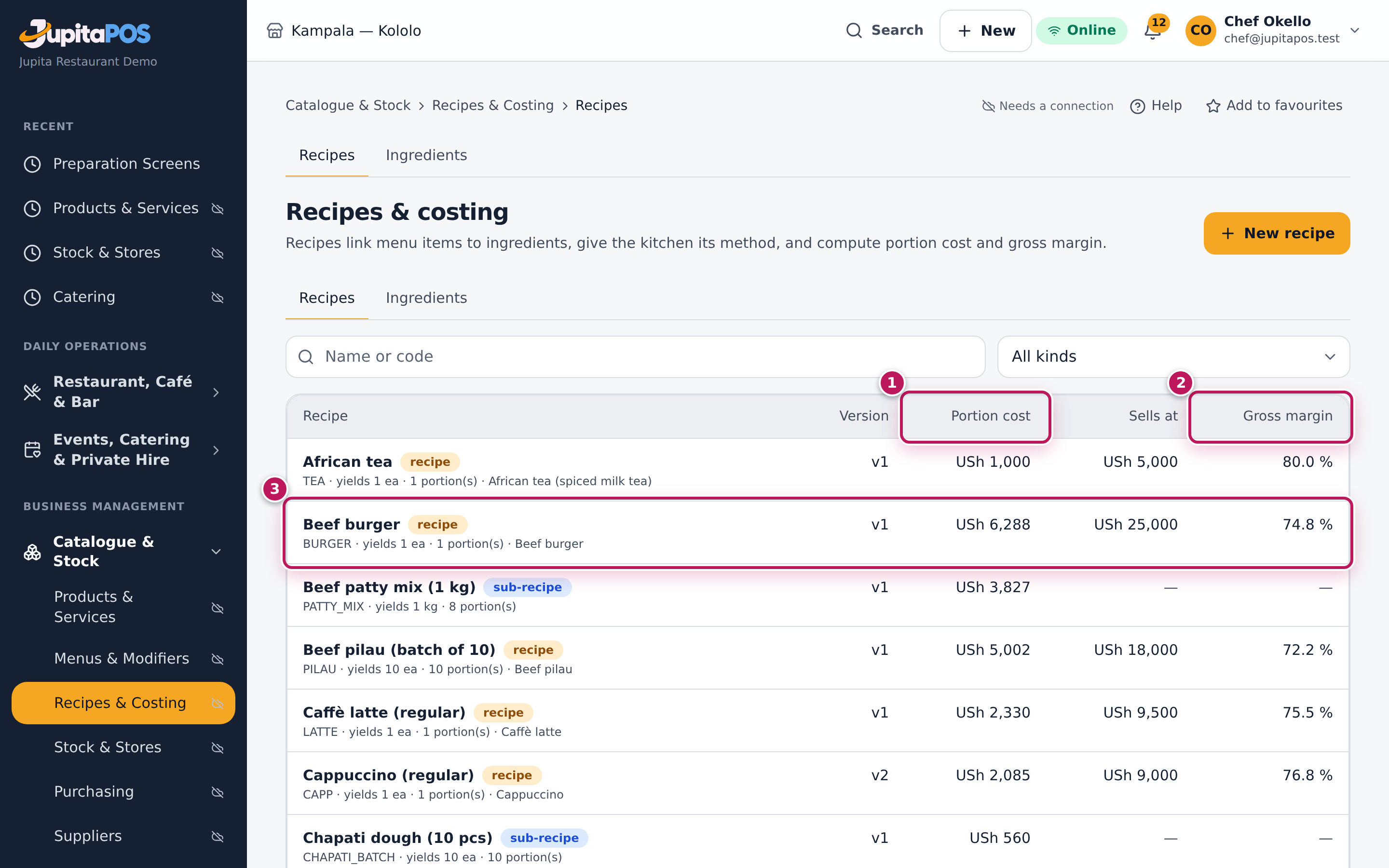
- Open Recipes & costing. The Recipes list shows, for each recipe, the Version, the Portion cost (1), what it Sells at and the Gross margin (2).
- Type in Search or choose a Kind to narrow the list.
- Tap a recipe (3), here Beef burger, to open it.
- Read the four cards: Batch cost, Portion cost (1), Gross margin (2) and Food cost % (3).
- Read the lines: for each ingredient the Net qty, the Gross qty (4) you have to buy for it, the Unit cost and the Cost.
Expected result
The Beef burger costs USh 6,288 a portion and sells at USh 25,000: gross margin 74.8 %, food cost 25.1 % (profit USh 18,712 a burger). The biggest line is the patty mix (USh 4,252); the optional cheddar (USh 760) is shown but not counted.
Screenshot
Common mistakes
- Reading an archived version. The costs are those of the active version; an archived one in the list on the left shows its lines only.
- Comparing with a price that is not the one charged. The margin uses the menu item’s base price. A happy-hour or branch price is set in the menu (see Set a price rule).
Troubleshooting
- Every cost shows “—”. You do not have
menu.costs. - Portion cost “—” and the badge no active version. The recipe has no active version yet. Activate its draft.
- The unit cost is per kg, but the line is in grams. That is right: Unit cost is the ingredient’s own price (28,000/kg for beef mince); the line’s quantity is converted, and Cost is what that quantity costs.
FAQ
What is a good food cost? Many restaurants aim for 25–35 % on food and less on drinks. The card turns red above 40 %, and the margin turns amber below 50 %.
Re-cost after a price change
Purpose
When a supplier changes a price, change it once on the ingredient; every recipe that uses it — and every dish that uses those recipes — is costed again, so margins stay true.
Role / permission required
Chef, sous chef, store manager or owner with menu.recipes and
menu.costs.
Prerequisites
- The new price per stock unit, from the supplier’s invoice or quote (see Supplier prices and lead times).
Steps
- Open Recipes & costing, tap the Ingredients tab and search for the ingredient, here Limes.
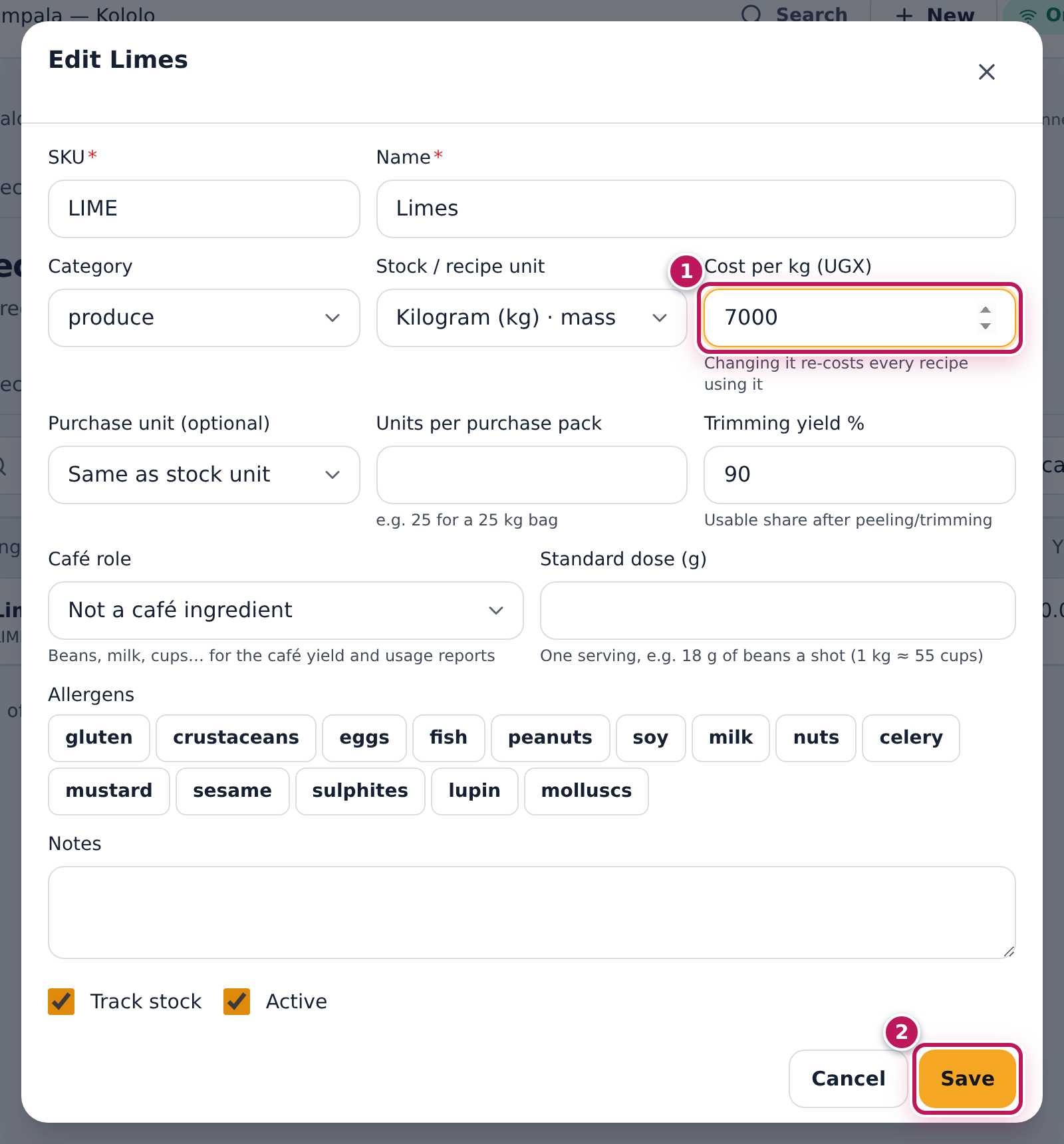
- Tap its row. The Edit Limes dialog opens.
- Type the new cost in Cost per kg (UGX) (1): 7000 (was 6,000).
- Tap Save (2).
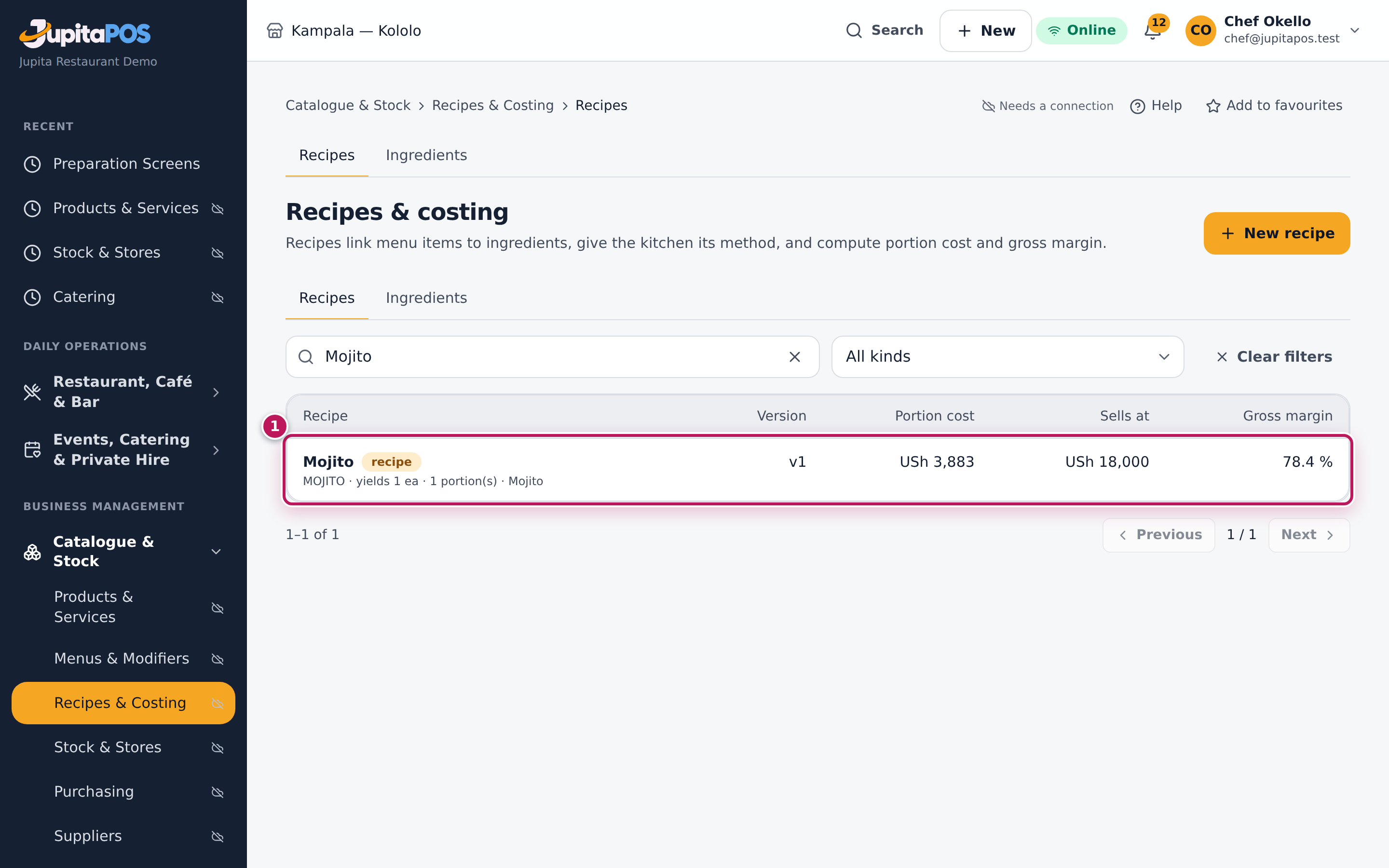
- Tap the Recipes tab and search for a dish that uses it, Mojito.
Expected result
The message says Limes saved; recipes are being re-costed. The re-costing runs in the background and takes a few seconds. The Mojito’s portion cost goes from USh 3,839 to USh 3,883 and its gross margin from 78.7 % to 78.4 %. Every other recipe with lime changes the same way.
Screenshot
Common mistakes
- Changing the recipe instead of the price. If the supplier’s price changed, change the ingredient. Change the recipe only when the dish changes.
- Typing the pack price. The cost is per stock unit (per kg, per L, per bottle).
Troubleshooting
- “Please enter a valid value” under Trimming yield %. Type a percentage from 0.01 to 100 with at most two decimals, such as 90.
- The recipe list still shows the old cost. The background re-costing has not finished, or the background workers are stopped. Wait a minute and reload; if it stays, ask the administrator to check the recipe-costing queue (see Read the Background jobs screen, in the Help Center inside JupitaPos).
Change a recipe with a new version
Purpose
Change a dish or a batch — more lime, less oil, a new garnish — without losing what it was before. The old version stays for history; the new one takes over the costing and the stock from the moment you activate it.
Role / permission required
Chef, sous chef, store manager or owner (menu.recipes).
Prerequisites
- The recipe has an active version and no draft (the New version button shows only then).
Steps
- Open the recipe (here the sub-recipe House dressing (500 ml), v1 active).
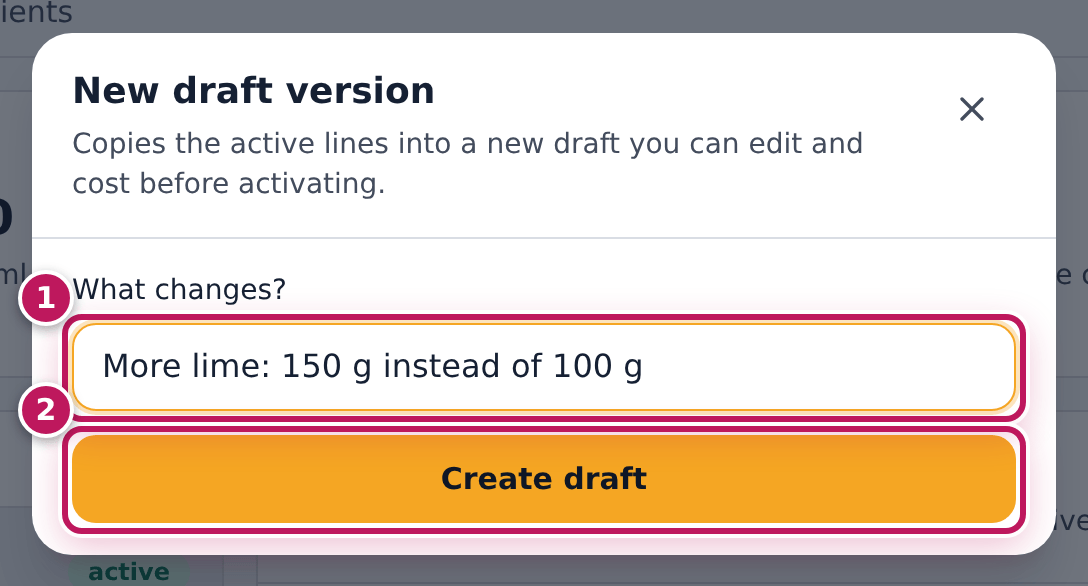
- Tap New version. In What changes? (1) type why, for example More lime: 150 g instead of 100 g.
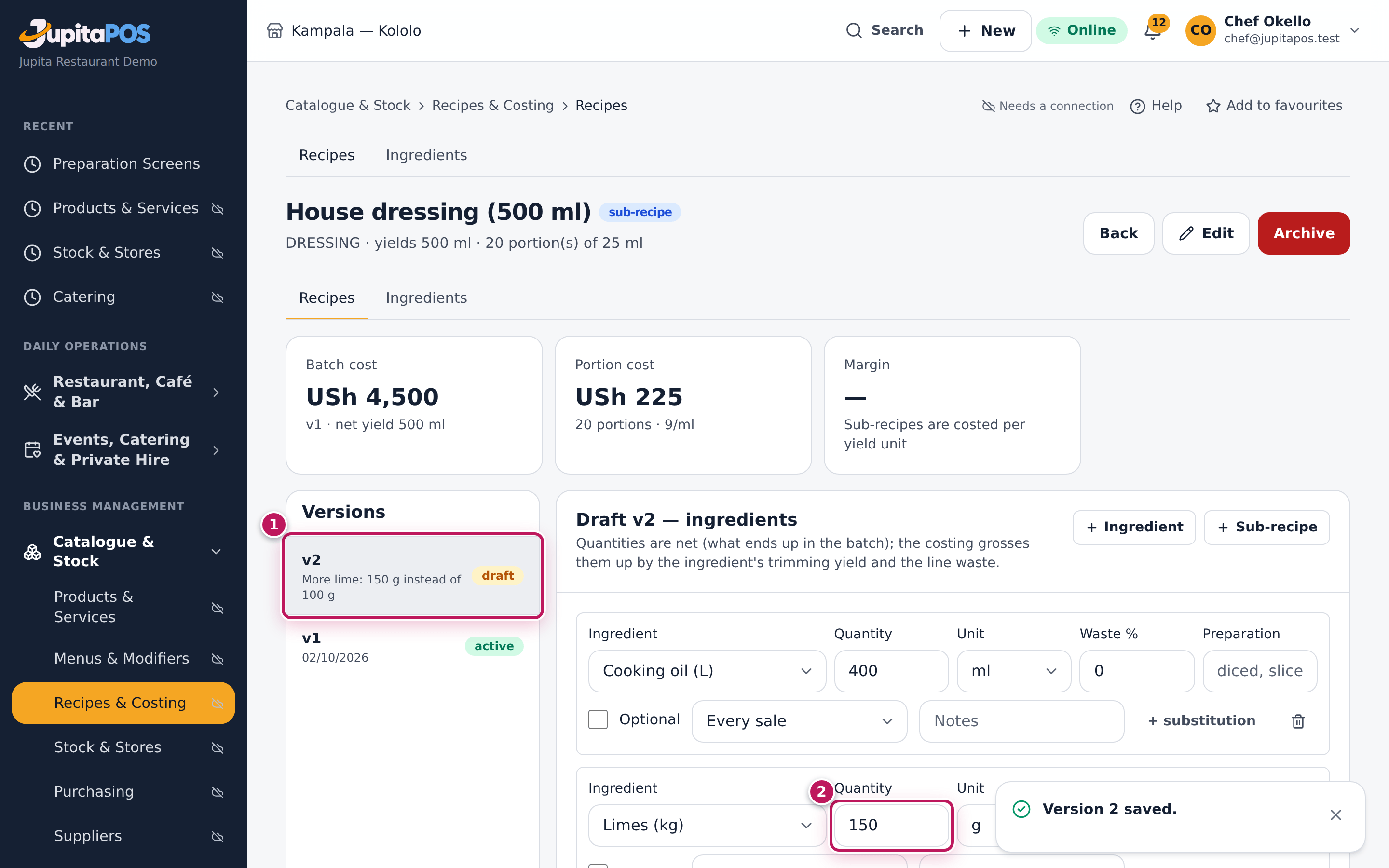
- Tap Create draft (2). A draft v2 opens with the active lines copied in.
- Change what is new: the limes line’s Quantity to 150 (2). Add or remove lines with Ingredient, Sub-recipe and the bin.
- Tap Save draft.
- Tap Activate v2, then Activate.
Expected result
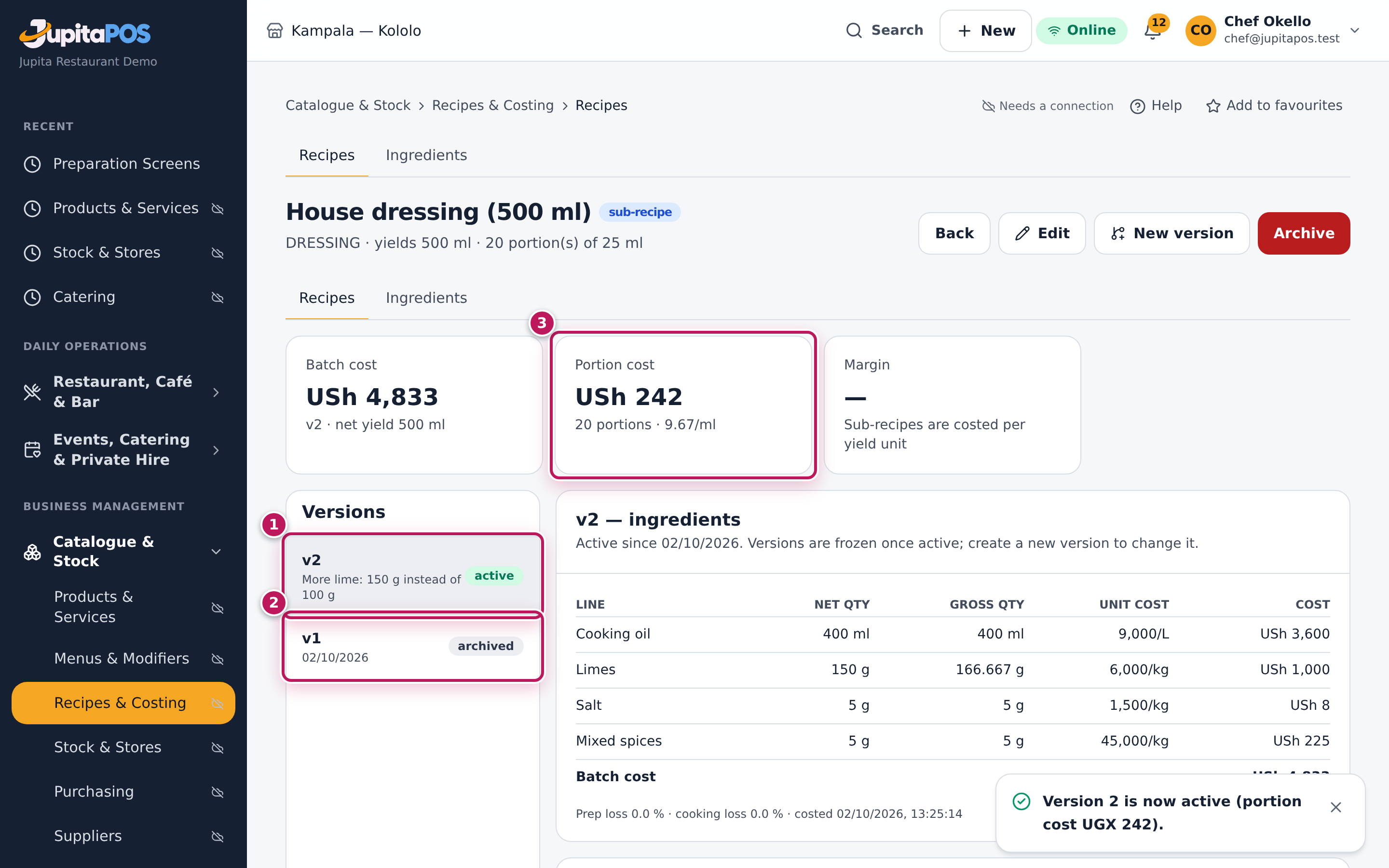
The Versions list shows v2 active (1) and v1 archived (2). The batch cost goes from USh 4,500 to USh 4,833 and the portion cost from USh 225 to USh 242 (3); every dish that uses the dressing is costed again. The change note shows under v2 in the list.
Screenshot
Common mistakes
- Leaving the draft unactivated. The kitchen card and the costing keep using the old version until you activate. Only one draft can exist at a time.
- Editing the header to change the dish. Edit changes the name, yield and portions of the recipe for every version; ingredient changes belong in a new version.
Troubleshooting
- There is no New version button. A draft already exists: pick it in the Versions list and carry on with it.
- “Save the draft before activating it.” Tap Save draft first; the activate button stays grey while there are unsaved changes.