

On this page
A retreat is a programme on set dates — a yoga weekend at the lake, a week of rest — sold in packages: a shared room, a room of one’s own, the days only. When your business has rooms, a package with a room books a stay at your property for the participants; the nights are in the package price. Payments are taken ahead as deposits and instalments, and the bill is raised at check-in.
A retreat is a day retreat (no rooms) or a residential one (rooms at your property). Everything a package includes — the room, a class place, a treatment — is reserved with the service that owns it when the booking is made. If one part cannot be reserved, the booking is not made and what it had reserved is let go again.
Retreats are under Events, Catering & Private Hire › Wellness
Retreats in the menu (/wellness/retreats) — the retreat coordinator’s
landing screen. They are a module (Yoga & wellness
retreats), switched on by an owner or administrator in Modules
(/system/modules); rooms in packages need the rooms module too
(Accommodation / PMS).
The words used on these pages:
| Word | Meaning |
|---|---|
| Retreat | a programme with a code (LAKE-NOV), dates, places and its terms |
| Package | what a participant buys: a room shared by one or two, or the days only, at a price per person |
| Itinerary | the sessions each day, each with its space and who leads it |
| Booking | one booker and everyone coming with them (RET-00001) |
| Deposit, balance | the two instalments: the deposit due when booking, the balance some days before the start |
| Draft | a booking saved with its people and choices, holding nothing until it is submitted |
| Exception | a booking whose parts could not all be let go after a failure; someone must look at it |
| Extra | something the guest asks for on top of the package, billed on its own once they agree |
Who does what:
| Role | What they do here |
|---|---|
| Retreat coordinator | everything: programmes, packages, the itinerary, bookings, payments, cancellations, check-in |
| Spa or gym manager | sees retreats; may lead itinerary sessions |
| Receptionist | checks in the stay at the property as usual |
Participants’ dietary needs are shown to the coordinator and the team; a
participant’s health note is sealed and read only with wellness.health.
Set up a retreat, its packages and itinerary
Purpose
Describe the retreat — its dates, places and terms — the packages people can buy and the itinerary, then open it for booking.
Role / permission required
Retreat coordinator or owner (retreats.manage).
Prerequisites
- The retreats module is on. For packages with a room, the rooms module is on and the property and its room types exist at the retreat’s branch.
- The spaces (a shala, a studio) and leaders are set up as resources and practitioners.
Steps
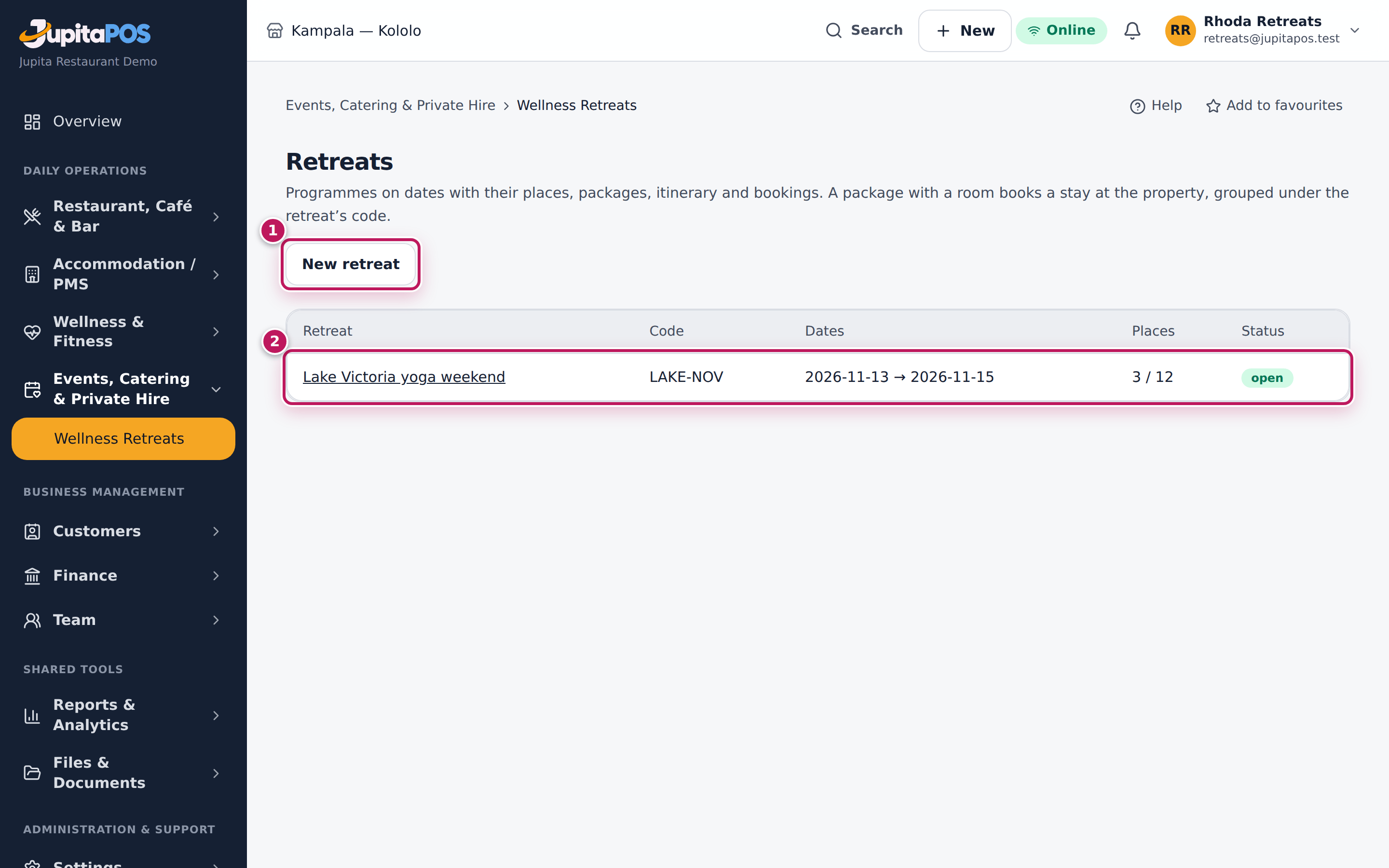
- Open Events, Catering & Private Hire › Wellness Retreats and choose New retreat (1).
- Give it a code, a name, the Branch, the Location, its dates and places, and the terms: the deposit percentage, the days before the start the balance is due, and the late-cancellation window and fee. Choose Rooms at for the property (a residential retreat), or leave it empty for a day retreat, and save.
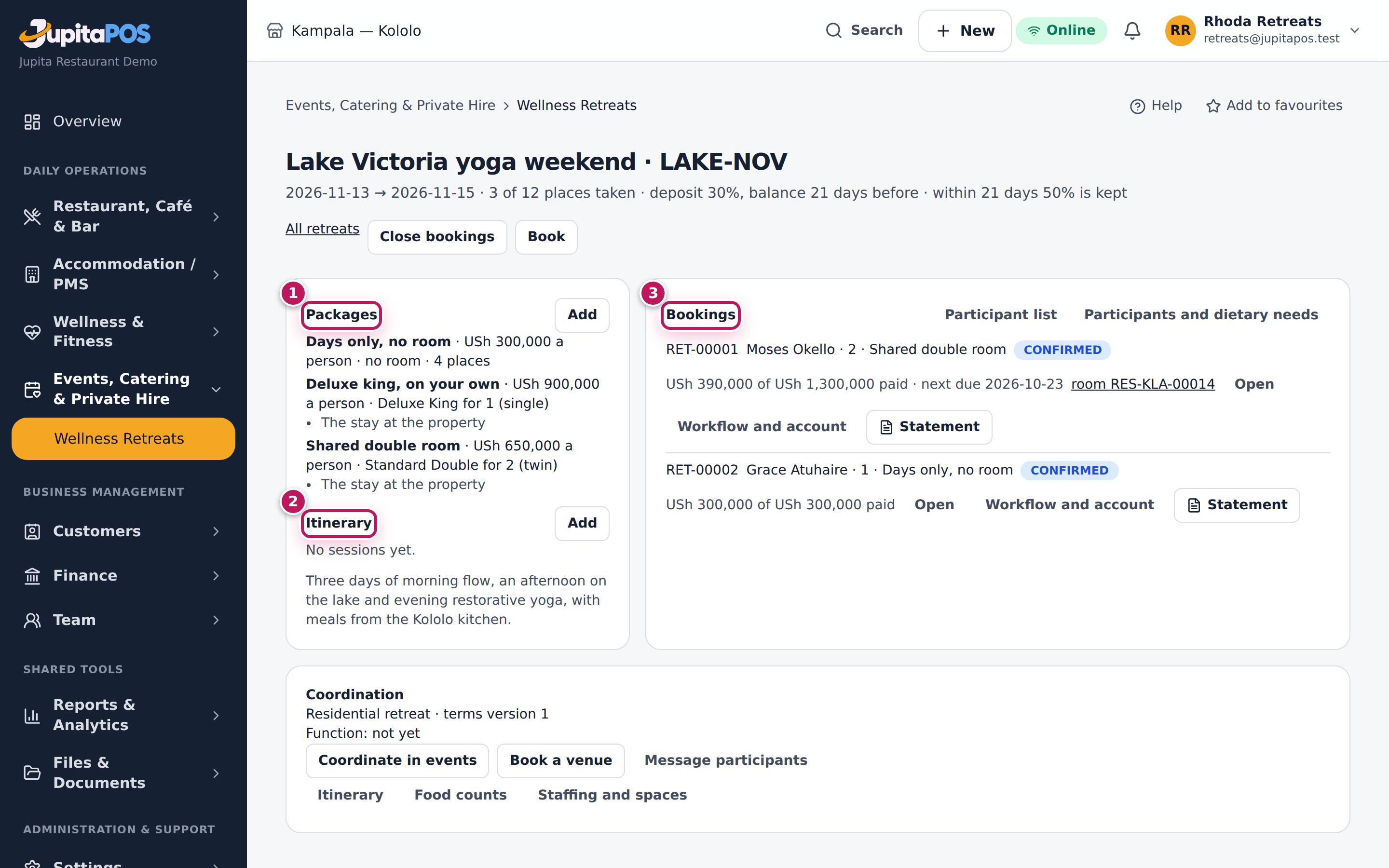
- Open the retreat. Under Packages (1), choose Add: a Code, a Name, the Price per person and Tax; for a room, the Room type and People per room — One or Two (shared); optional Places (optional) for this package.
- Under Itinerary (2), choose Add for each session: the Title, From and To, the Space and who it is Led by.
- Choose Open for booking.
- Under Coordination, choose Coordinate in events to make the retreat’s function in Events, then Book a venue for any events space it needs. The itinerary appears on the function’s run sheet.
Expected result
The retreat (2) is listed with its dates, places taken and status. Each itinerary session holds its space and leader, so neither is booked twice. Once open, the desk and — if switched on — the storefront can book it. Bookings (3) lists every booking.
Screenshot
Common mistakes
- Opening a retreat before adding a package: refused.
- Cancelling a retreat with live bookings: refused; cancel the bookings first.
Troubleshooting
- A session is refused. It falls outside the retreat’s dates, or its space or leader is taken at that time. A studio class at the same time takes the studio too.
- What a package includes (classes, treatments, meals, choices) is set up by your administrator or integrator; there is no screen for it yet.
Book participants on a retreat
Purpose
Book a client and the people coming with them on a package, with their dietary needs, and — with a room — their stay at the property.
Role / permission required
Retreat coordinator (retreats.bookings). A health note needs
wellness.health.
Prerequisites
- The retreat is open for booking and has places left.
Steps
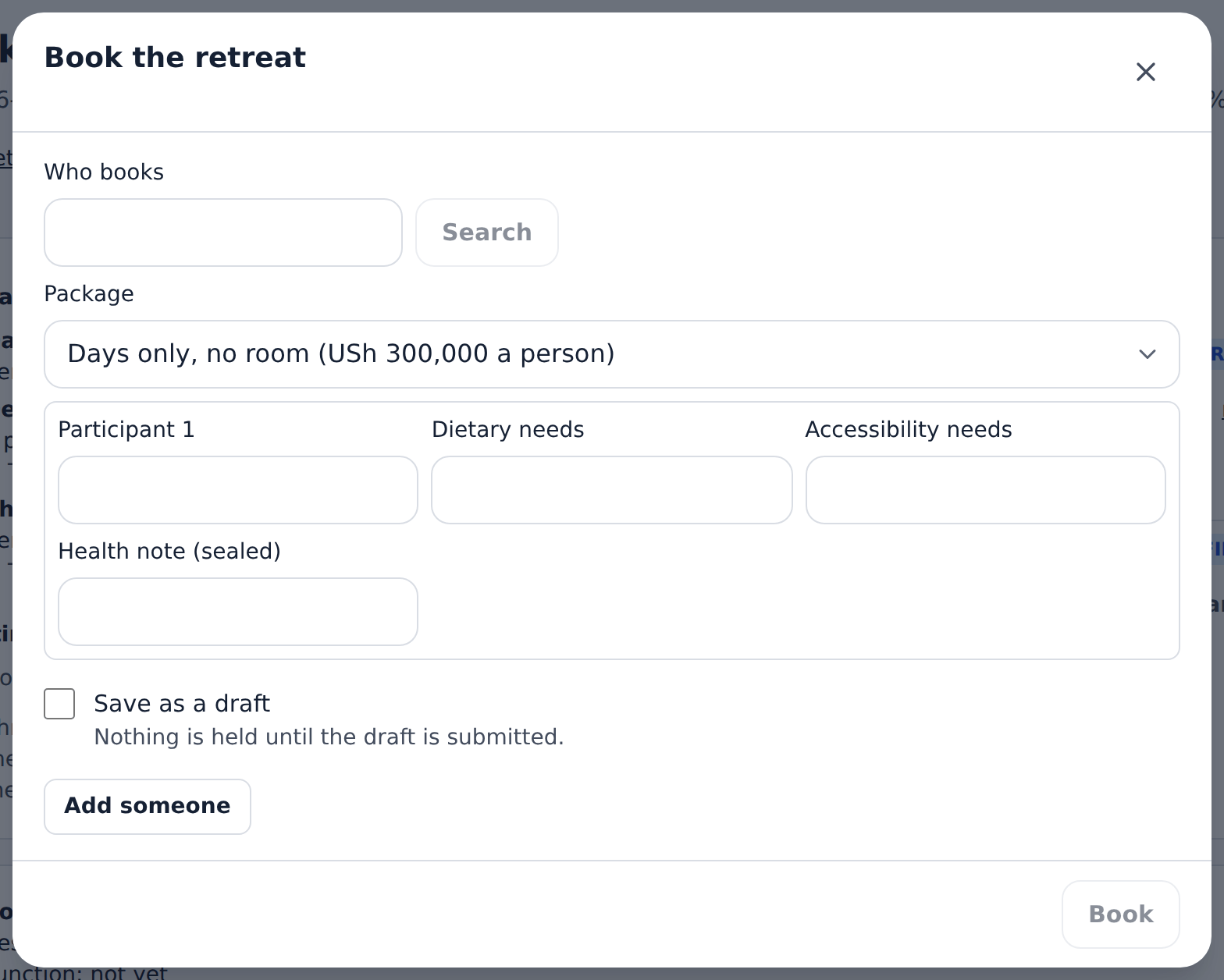
- Open the retreat and choose Book.
- Under Who books, Search the customer.
- Pick the Package.
- Name everyone coming; choose Add someone for each. Give their Dietary needs, their Accessibility needs, and a Health note (sealed) when you may.
- Under Guest choices, tick what the guest picked from the package’s options.
- Choose Book — or tick Save as a draft first to keep it without holding anything, and Submit the draft later from Workflow and account.
Expected result
The booking is numbered and Confirmed once everything the package reserves is held: the room, the class places, the treatments. Its deposit is due today and its balance before the start. With a room, a confirmed stay is booked at the property in the booker’s name for the retreat’s dates, at no room rate of its own — the nights are in the package.
Screenshot
Common mistakes
- Booking three people on a shared double: a room takes up to its sharing. Make a second booking.
Troubleshooting
- “No room free”. The property has no room of the package’s type for those nights; the booking is let go and nothing is paid.
- “Not booked: the class is full” (or a treatment cannot be placed). What the booking had already reserved is let go and the booking is cancelled; Workflow and account shows what was reserved, what failed and what was let go. If something could not be let go, the booking shows Exception: cancel it once the cause is fixed.
- “Full”. The retreat or the package has no places left.
Take payments, cancel and check participants in
Purpose
Take the deposit and the balance, cancel under the retreat’s terms, and check participants in when they arrive.
Role / permission required
Retreat coordinator: payments and cancellations (retreats.bookings and
payments.take); check-in and attendance (retreats.checkin); extras,
rooms and consent (retreats.bookings). Waiving a cancellation fee, moving
a session and messaging participants need retreats.manage. Only those who
book see dietary and accessibility needs in the participant list.
Prerequisites
- The booking exists. For a cash payment or refund, a till is open.
Steps
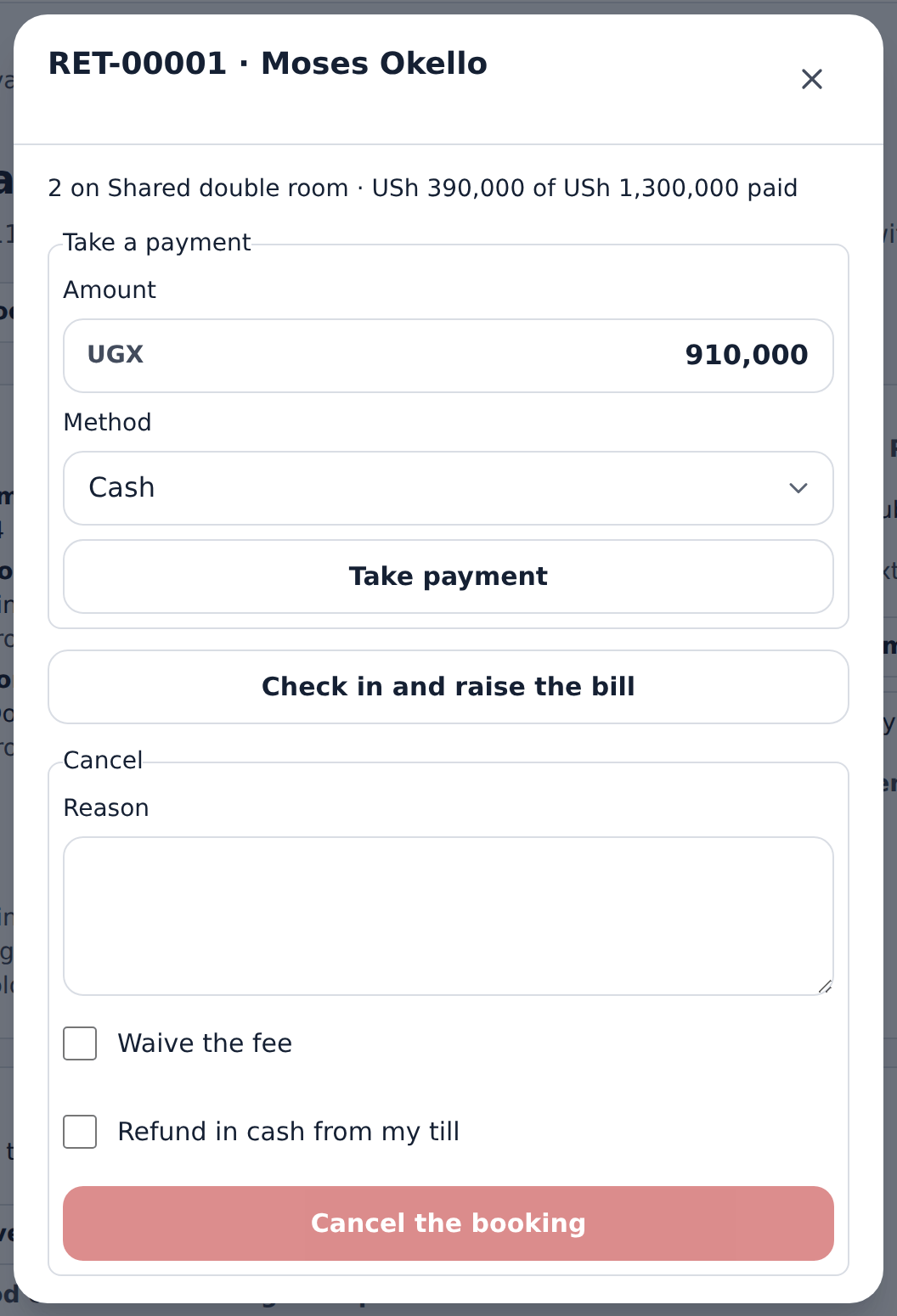
- Open the retreat and choose Open on the booking.
- Take a payment: set the Amount and Method (with the Transaction reference for a card or mobile money), then Take payment. Payments pay the deposit, then the balance.
- Cancel: give a Reason, tick Waive the fee or Refund in cash from my till as needed, and choose Cancel the booking.
- On arrival (from the first day to the last), choose Check in and raise the bill. What was paid ahead pays it; choose Take the rest at the till for anything left.
- Choose Statement for a PDF of the booking’s payments.
- For extras, in Workflow and account, pick the Extra and How many, then Propose the extra. When the guest agrees, give Agreed by (to approve) and choose Approve and bill; it is billed on its own. Decline one the guest does not want.
- During the retreat, choose Participant list to allocate each person’s Room and Record consent. Choose Attendance on an itinerary session, tick who came and Save attendance. Move a session to change its time, space or leader; participants are sent a note (prepared, not sent, until messaging is switched on).
- Choose Itinerary, Food counts or Staffing and spaces under Coordination for the documents, and Message participants to prepare a note to everyone booked.
Expected result
Payments are held as the client’s deposit until check-in, when the bill is raised and paid from them. What the package includes is never billed again; extras are billed on their own. A cancellation inside the late window keeps the fee (never more than was paid) under the terms the guest accepted, and refunds the rest; the stay at the property, the class places and the treatments the booking reserved are let go too. The account under Workflow and account shows the package, what it includes, the extras, what was paid and what is due.
Screenshot
Common mistakes
- Checking in the stay but not the retreat booking: the front desk checks in the room; the coordinator checks in the retreat, which raises its bill.
Troubleshooting
- A payment is refused. It would take more than the booking’s total.
- The internet is down at arrivals. Use Wellness offline: arrivals are ticked on the device and checked in later (see Keep working without a connection).